
 Share
Share
 Print
Print
|
|
|
|
|


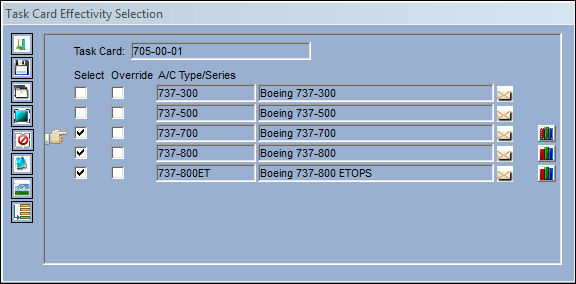
The Task Card Range  button takes the user to the Task Card Effectivity window. This window allows the user to apply effectivity to an aircraft by using the A/C, A/C S/N, Line, Variable Number, SGML Designator or IPC of the aircraft.
This button will only appear next to an A/C Type/Series if that Type/Series is effective to the specified Task Card and has been set up with a range for one or more of the range types listed below.
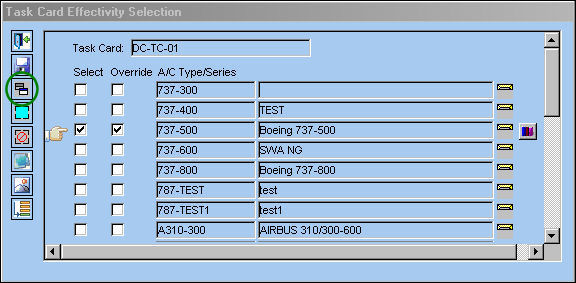
From the Task Card Effectivity Selection window, select the Task Card Range button.
TRAX displays the Task Card Effectivity Range window.
Select the New  button to create a range of effectivity for the Task Card.
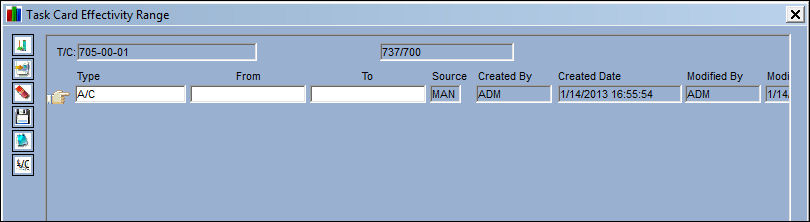
The following information/options are available in this window:
_____________________________________________________________________________________
Type drop down
Select the range Type from the drop down menu. This option allows the user to easily enter a range without having to override the record to the A/C S/N level. For example, this option is used when an AD states a specific range that the AD is effective to. The user does not have to override the A/C Type/Series to manually select/deselect the necessary A/C Tail Numbers.
A/C  - This information is set-up in the A/C Master, General tab.
S/N (Serial Number) - This information is set-up in the A/C Master, General tab.
Line - This information is set-up in the A/C Master, Optional 2 tab.
Variable No - This information is set-up in the A/C Master, Optional 2 tab.
SGML Designator - This information is set-up in the A/C Master, Optional 2 tab.
IPC - This information is set-up in the A/C Master, Optional 2 tab.
From-To Range
Enter the From - To range for effectivity to be applied.
Source
The way that the range was imported/created. This field is updated automatically. The available options are E/C, IPC, and MAN (Manual). The Source is 'MAN' when any part of the range was entered or altered manually.
Created By
The user who created the record.
Created Date
The date the record was created.
Modified By
The user who last modified the record.
Modified Date
The date the record was last modified.
_____________________________________________________________________________________
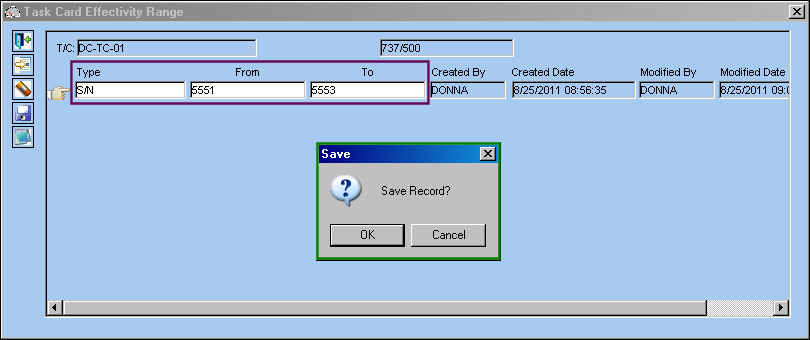
Select a Type from the Type drop down menu. In this example, the user has selected the S/N Type. Populate the From-To range and select the Save  button. The Save prompt appears. Select 'OK'.
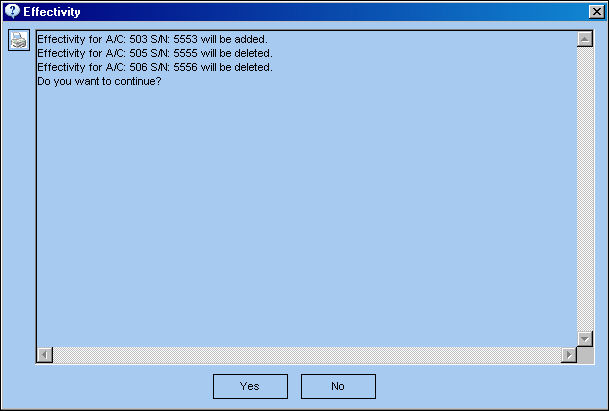
The following effectivity pop-up window will appear informing the user that all other effectivity for the specified Task Card will be deleted. This pop-up only appears if the Task Card has prior effectivity.
Select 'Yes' to continue.
From the Task Card Effectivity selection window, select the Override  button:
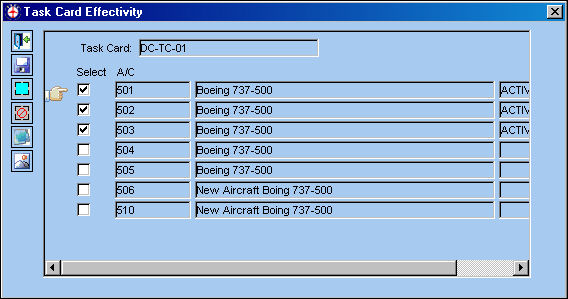
As defined, aircraft 501-503 are effective:
Additionally, the Individual A/C Selection  button allows the selection and creation of multiple individual range records using cross reference information for every serialized A/C.
Information can be entered through the Notes  button.
Share
Print
|
©1997-2026 Trax USA Corp. All rights reserved. This manual may not be copied, photocopied, reproduced, translated, or converted to any electronic or machine-readable form, in whole or in part, without prior written approval from Trax USA Corp. |
 |