
 Share
Share
 Print
Print
|
|
|
|
|


P/N Software Configuration Authorization Group Explorer
The P/N Software Configuration Authorization Group Explorer windows allows users to designate which users belong to each P/N Software authorization group. From this window users can be assigned to authorization groups or removed from them. Once a user is assigned to the appropriate group(s), they can authorize P/N Software components via the P/N Software Configuration Authorization Explorer.
 This window is security-controlled via Settings/ Explorer/ P/N Software Configuration Auth Grp Explorer. For more information refer to the Security Explorer via the System Administration Training Manual.
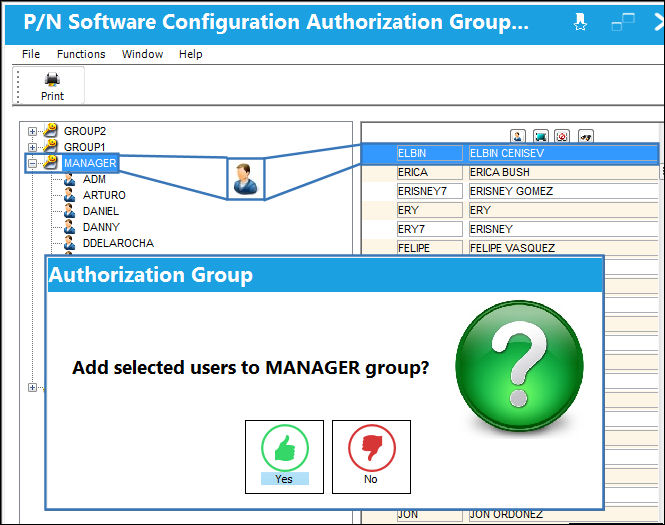
To add a user to an authorization group, select the user(s). Once all necessary users are selected, click and hold the Drag Drop  button, then drag it to the desired authorization group. Once at the desired group, drop the user by releasing the button.
Share
Print
|
©1997-2026 Trax USA Corp. All rights reserved. This manual may not be copied, photocopied, reproduced, translated, or converted to any electronic or machine-readable form, in whole or in part, without prior written approval from Trax USA Corp. |
 |