
 Share
Share
 Print
Print
|
|
|
|
|


W/O Setup and Configuration
Before creating Work Orders, administrators must set up the security, authorization, and revision configurations.
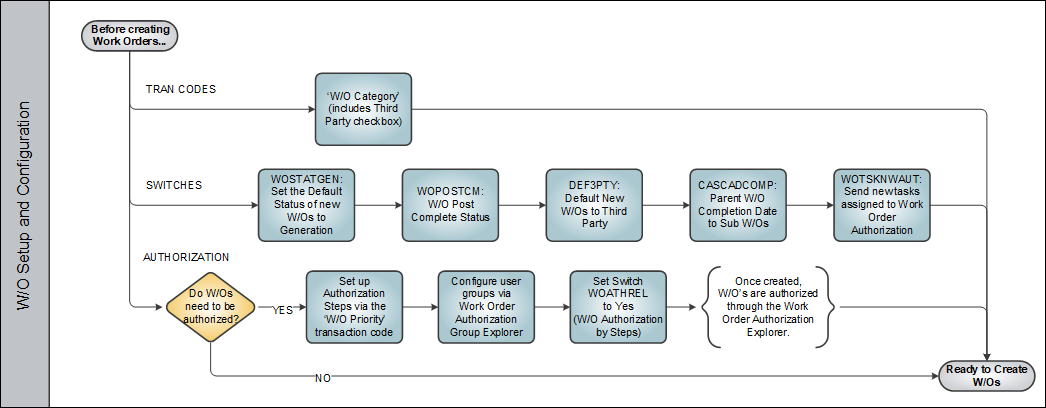
- The W/O Category transaction code allows users to not only define the Work Order's category but also a collection of various default settings. These settings include the ability to configure its Non-Routine Task Cards, its Called On E/Cs, and Expenditure selections, among others. For more information refer to W/O Category.
- The listed switches configure some of the most broad features that affect Work Order management (for example, when creating and completing W/Os). For more information refer to the following switches:
- WOSTATGEN
- WOPOSTCM
- DEF3PTY
- CASCADCOMP
- WOTSKNWAUT
Note: Many other switches that affect Work Orders will be mentioned throughout this process. For more information on all available switches, refer to the Production Switches Manual.
- Depending on your company's operating procedures, Work Orders may require authorization. For more information refer to Do W/Os require Authorization?
Once all of these configurations have been set up, users can begin Creating Work Orders.
Share
Print
|
©1997-2026 Trax USA Corp. All rights reserved. This manual may not be copied, photocopied, reproduced, translated, or converted to any electronic or machine-readable form, in whole or in part, without prior written approval from Trax USA Corp. |
 |