
 Share
Share
 Print
Print
|
|
|
|
|


Creating Work Orders
Production Work Orders for line and heavy aircraft maintenance are primarily created through the Production/ Update/ W/O window. For work dealing with component repairs and overhauling, Shop Work Orders are created through the Shop module.
Because both types of Work Orders serve a similar purpose, as shells that help organize the required mechanic or specialist workload, both Production and Shop W/Os contain many of the same features and basic structure. For this process flow, however, Production Work Orders will be highlighted.
The following is the basic life cycle of a Production Work Order, from its creation, to workload assignment, to task completion:
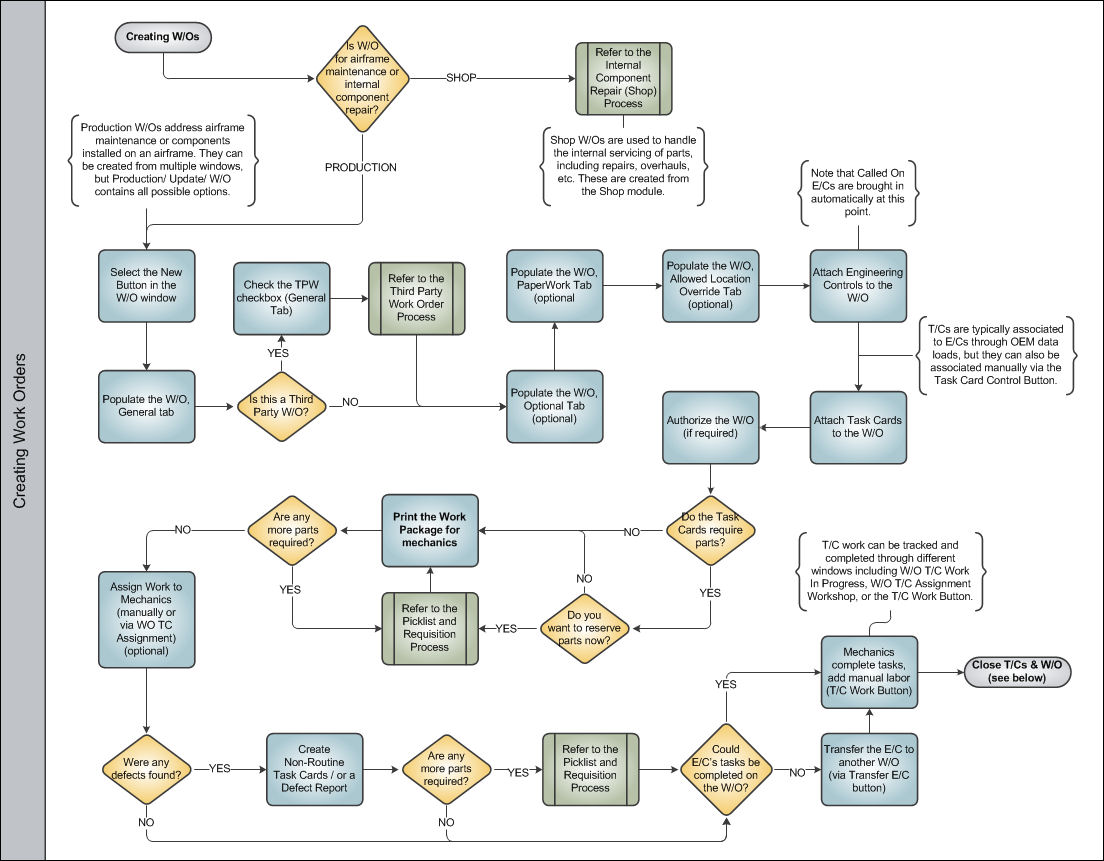
Work Orders can also be created from other windows throughout TRAX (for example, planners typically schedule workloads based on upcoming E/C requirements via the Planning query), but the W/O window in Production is the central hub for all W/O-related options and functionality. Other W/O creation options will be mentioned throughout this document.
Once a Work Order goes through this basic life cycle, move on to the Closing Work Orders process.
Share
Print
|
©1997-2026 Trax USA Corp. All rights reserved. This manual may not be copied, photocopied, reproduced, translated, or converted to any electronic or machine-readable form, in whole or in part, without prior written approval from Trax USA Corp. |
 |