
 Share
Share
 Print
Print
|
|
|
|
|


Closing Work Orders
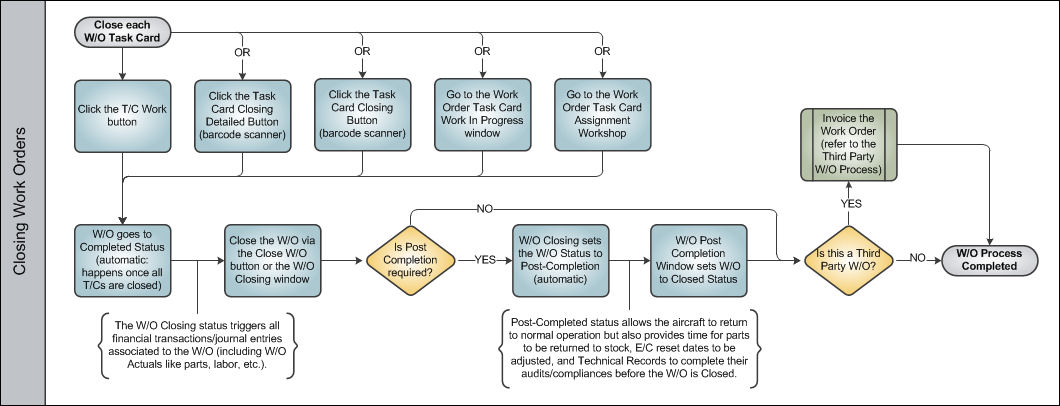
Before a Work Order can be closed, each Task Card attached to the W/O must be actioned (closed, deferred, canceled). The Work Accomplished, date and time of the completion, and Location are some of the details that should be entered when closing each Task Card (as determined by company protocols/configurations).
To close W/O Task Cards, TRAX users have several options.
- Task Card Work Button
- Task Card Closing Detailed Button
- Task Card Closing Button
- Work Order Task Card Work In Progress
- Work Order Task Card Assignment Workshop
Once the W/O Task Cards are closed, the Work Order itself can be closed. The process of closing a W/O can involve multiple steps, depending on the setting of Production switch WOPOSTCM.
When Production Switch  WOPOSTCM is set to Yes, when a user closes a W/O using the W/O Task Card, Close W/O button or the W/O Closing window, the W/O status changes from Completed to Post Completed. Compliance records are written for controls attached to the W/O and repeat schedules are reset. Users can return to stock (RTS) unused material that was issued to the W/O to credit the W/O Actuals.
When WOPOSTCM is set to No, when the user closes a W/O the W/O status changes from Completed to Closed. Compliance records are written and schedules reset; unused material cannot be RTS to credit the W/O Actuals because the W/O and its financials are closed.
 Note: In Version 15, switch WOPOSTCM must be set to Yes because the No setting is no longer supported. Work Order Statuses will only go from 'Completed' to 'Post Completed', and not from 'Completed' directly to 'Closed'.
Once the W/O status is Closed, the Customer Invoicing process can begin for MRO providers.
The following is the basic process flow for closing a W/O.
Share
Print
|
©1997-2026 Trax USA Corp. All rights reserved. This manual may not be copied, photocopied, reproduced, translated, or converted to any electronic or machine-readable form, in whole or in part, without prior written approval from Trax USA Corp. |
 |