
 Share
Share
 Print
Print
|
|
|
|
|


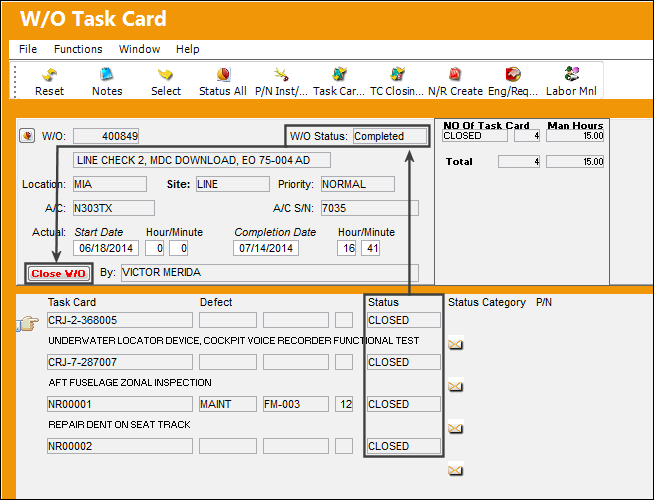
W/O goes to Completed Status
Once all Work Order Task Cards are closed, the W/O status automatically changes from Open to Completed and the W/O is ready to be closed.
When Production Switch  WOPOSTCM is set to Yes, when a user closes a W/O using the W/O Task Card, Close W/O button or the W/O Closing window, the W/O status changes from Completed to Post Completed. Compliance records are written for controls attached to the W/O and repeat schedules are reset. Users can return to stock (RTS) unused material that was issued to the W/O to credit the W/O Actuals.
When WOPOSTCM is set to No, when the user closes a W/O the W/O status changes from Completed to Closed. Compliance records are written and schedules reset; unused material cannot be RTS to credit the W/O Actuals because the W/O and its financials are closed.
Share
Print
|
©1997-2026 Trax USA Corp. All rights reserved. This manual may not be copied, photocopied, reproduced, translated, or converted to any electronic or machine-readable form, in whole or in part, without prior written approval from Trax USA Corp. |
 |