
 Share
Share
 Print
Print
|
|
|
|
|


Select the Effectivity Audit  button to view an audit trail of all Aircraft Effectivity changes made to the currently selected E/C. The information provided in this audit includes the Date the effectivity changes were made, the user who made the changes, and details of what the changes to the effectivity were. The tree-like view allows the user to expand and collapse each record per transaction in order to make before/after comparisons.
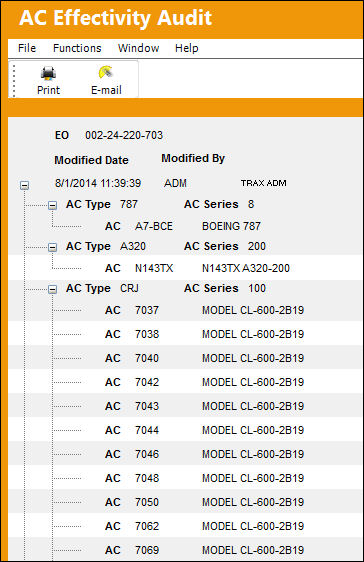
The layout of the A/C Effectivity Audit window and all other Audit windows throughout the system have been updated in TRAX Version 11 and all later releases of TRAX.
 Note: To view an audit trail of all individual A/C Effectivity changes made to the currently selected E/C, use the Individual Engineering Control Audit (Individual A/C) located next to each A/C record in the A/C CTL window.
Note: To view an audit trail of all A/C Type/Series Effectivity changes made to the currently selected E/C, use the individual Engineering Control Audit (A/C Type/Series) located next to the Type/Series record in the A/C CTL window.
Share
Print
|
©1997-2026 Trax USA Corp. All rights reserved. This manual may not be copied, photocopied, reproduced, translated, or converted to any electronic or machine-readable form, in whole or in part, without prior written approval from Trax USA Corp. |
 |