
 Share
Share
 Print
Print
|
|
|
|
|


Defects can be deferred to a schedule consisting of hours/cycles/days.
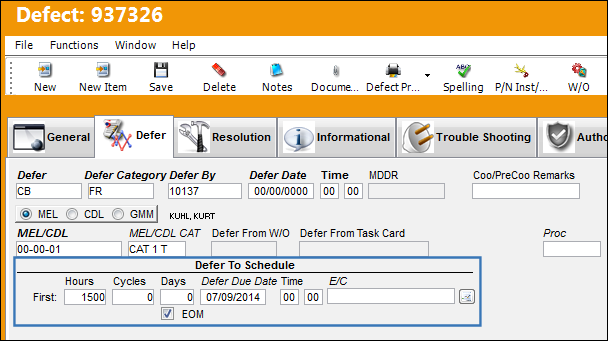
The following information/options are available in this window:
_____________________________________________________________________________________
Defer To Schedule Hours/Cycles/Days
The number of flight hours/cycles/days in which the deferment must be resolved from the beginning of the Report or Defer Date based on system configuration.
The Defer To Schedule Hours field works with Calendar Hours and the Defer To Schedule Days works with the Calendar Days checkbox.
Defer Due Date
The date and time the deferment must be resolved by.
Defer To Schedule Time
The scheduled time that the deferment must be resolved by.
Defer To Schedule E/C
The E/C which the Deferred Defect will follow for a schedule. When this E/C is placed on a Work Order, a Non-Routine Task Card will be created for the associated Deferred Defect.
The E/C will automatically populate if set for the specified MEL/CDL/GMM. For more information, refer to the MEL Master, General Tab.
EOM checkbox
When selected, the scheduled Due Date for the Defer is in the End of the Month. For example, if the scheduled Due Date 9/22/2016, with the EOM checkbox selected, the Due Date becomes 9/30/2016. When the EOM checkbox is selected, a red EOM icon appears under the Due Date.
 This checkbox is security controlled via the Security Explorer/ Technical Records/ Update/ Defect Report/ /Defect Report Defer EOM Checkbox. For additional information, refer the the Security Explorer via the System Administration Training Manual.
_____________________________________________________________________________________
Share
Print
|
©1997-2026 Trax USA Corp. All rights reserved. This manual may not be copied, photocopied, reproduced, translated, or converted to any electronic or machine-readable form, in whole or in part, without prior written approval from Trax USA Corp. |
 |