
 Share
Share
 Print
Print
|
|
|
|
|


Exchange Order Receiving, General Tab
The Exchange Order Receiving, General tab is used to enter the component bin or tool location and information.
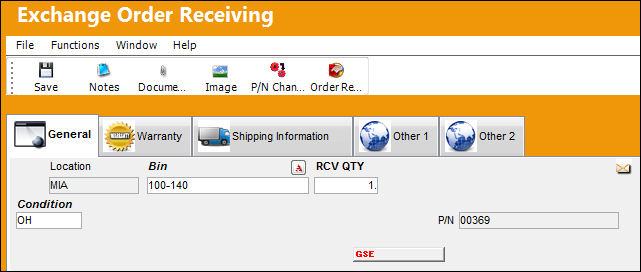
The following information/options are available in this window:
_____________________________________________________________________________________
Location
The Location for maintenance events, inventory stores, orders, transactions, or training events.
Bin
The specific storage bin within the inventory location.
 GREYOUTBINPREF: When set to Yes and the P/N has been set up with preferred bin locations, then the Bin field will be automatically greyed out from the following windows:P/N Initial Load, Bin Transfer, Order Receiving, Return To Stock. When set to No, the Bin field will be available regardless of prior preferred bin locations set up for the P/N.
Tool Area
The location/area of the tool. This is similar to a bin for tools. This field appears when the part being received is a tool.
Auto Populate Bin  button
Select this button to auto populate the bin for this part. The bin must be set up against the part in the P/N Master. For additional information, refer to the Bin Category field, via the P/N Master, Optional Tab of the Settings Training Manual.
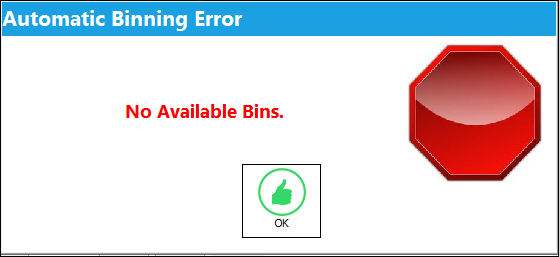
If the dimensions of the part (set up via the P/N Master, Optional Tab) exceed the size of the bin, the user will receive the following error:
S/N
The Serial Number for the specific serialized part.
Condition
The condition of the part.
P/N
The Part Number reference for the aircraft part.
Requires R.I.
If a component requires secondary inspection, the Requires R.I. flag will appear. By checking the R/I flag box via the Part Number Master/Technical Engineering Tab, receiving inspection of the component will be required before it is received into inventory or issued.
General
If the component being received is a general inventory type, the General flag will appear.
GSE
If the component being received is a GSE inventory type, the GSE flag will appear.
Maintenance
If the component being received is a maintenance inventory type, the Maintenance flag will appear.
Non-Inventory
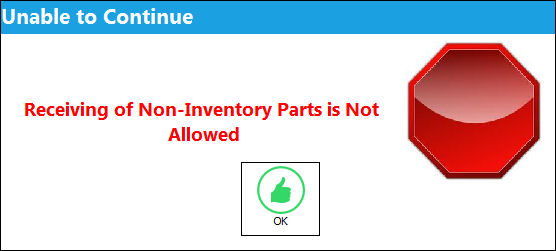
If the order was for a non-inventory part (a part not set-up in the P/N Master or P/N Master General Inventory), the Non-Inventory Flag will appear.
Shelf Life EXP
The shelf life expiration date of the part, as applicable.
When receiving a One Way Forward interchangeable P/N that does not have the Shelf Life Flag selected in its P/N Master, Inventory tab instead of the Main P/N that does have a Shelf Life Flag selected, the Shelf Life EXP date will not be available.
Tool Life EXP
The tool life expiration date of the part, as applicable.
When receiving a One Way Forward interchangeable P/N that does not have the Tool Control and Tool Calibration Flag selected in its P/N Master, Inventory tab instead of the Main P/N that does have a Tool Control and Tool Calibration Flag selected, the Tool Life EXP date will not be available.
Tool Calibration Number
This is a unique number used to define a tool. This field only appears if the Tool Calibration Number Required checkbox is selected via the P/N Master, Inventory tab, via the P/N Master of the Settings Training Manual.
- DRONIP - (Deny Receiving Of Non-Inventory Parts) - If set to No, non-inventory parts can be received. If set to Yes, a message will appear that stops the user from completing the receipt.
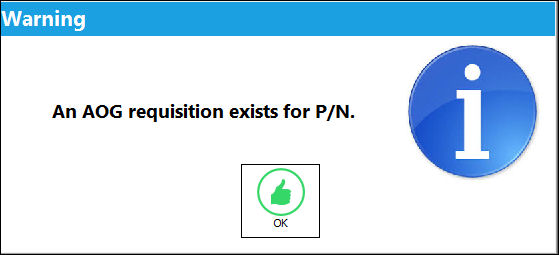
- RCVAOGMS - (Receiving AOG Notification Message) - If set to Yes, when receiving a P/N that has an AOG requisition, an alert appears indicating that an AOG requisition exists for the P/N.
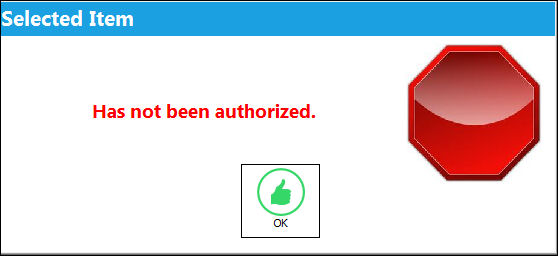
- PORCVAU - (Allows Only Authorized Orders to Be Received) - If set to Yes, orders that have not been previously authorized cannot be received. If authorization is required and the Order being received has not been authorized, the following prompt will appear:
- DNTALWBOG - (Do not allow bogus parts to be received) - If set to Yes, the system will not allow a bogus part to be received with a hard warning. If set to No, the system will allow a bogus part to be received with only a soft warning. Nevertheless, the serial number can be received after confirming the message with the option to select Yes. For more information, please refer to the TRAX Training Manual Inventory, Chapter Inventory Bogus P/N.
_____________________________________________________________________________________
Share
Print
|
©1997-2026 Trax USA Corp. All rights reserved. This manual may not be copied, photocopied, reproduced, translated, or converted to any electronic or machine-readable form, in whole or in part, without prior written approval from Trax USA Corp. |
 |