
 Share
Share
 Print
Print
|
|
|
|
|


Receiving an Exchange Order
After creating an Exchange Order, the user can receive the serviceable P/N from the specified Vendor. This is done through the Order Receiving window of the Receiving module. If necessary, the P/N can then go through a Receiving Inspection to complete the Receiving process.
Note: The Process Sequence of Receiving and Issuing an E/X is dependent on the user's company procedures or situation of requiring a serviceable P/N. For example, in an emergency, like AOG, a P/N of an E/X may need to be received before an unserviceable P/N is issued in exchange. However, per a company's policy, a P/N of an E/X may be required to be issued to a Vendor before a serviceable P/N can be received.
The following is the basic life cycle of an Exchange Order, particularly the receiving part of the process:
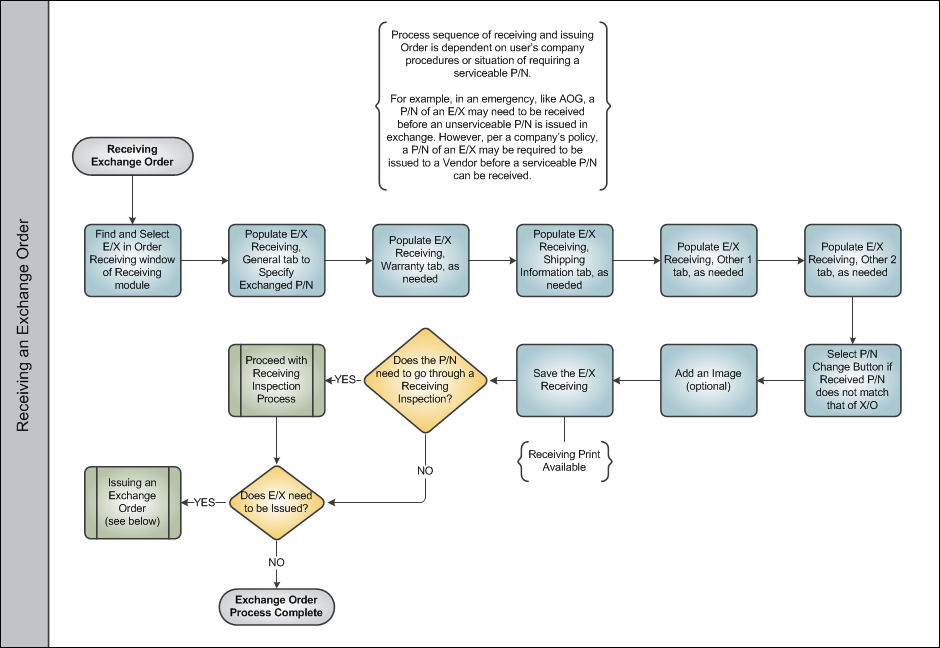
Once an Exchange Order goes through this basic life cycle, it is either necessary to move on to Issuing the Exchange Order or the Exchange Order Process is complete.
Share
Print
|
©1997-2026 Trax USA Corp. All rights reserved. This manual may not be copied, photocopied, reproduced, translated, or converted to any electronic or machine-readable form, in whole or in part, without prior written approval from Trax USA Corp. |
 |