
 Share
Share
 Print
Print
|
|
|
|
|


Dent:
From the General tab, 'Dent' is selected as the Damage Type.

Notice that the Damage tab reads 'Dent.' Users can describe the dimensions of the Dent through the limit fields. If the dimensions cannot be measured, the limits can be entered through the Follow Up Requirements (FUR) window. For more information refer to the Follow Up Requirements, via Non-Routine Express.
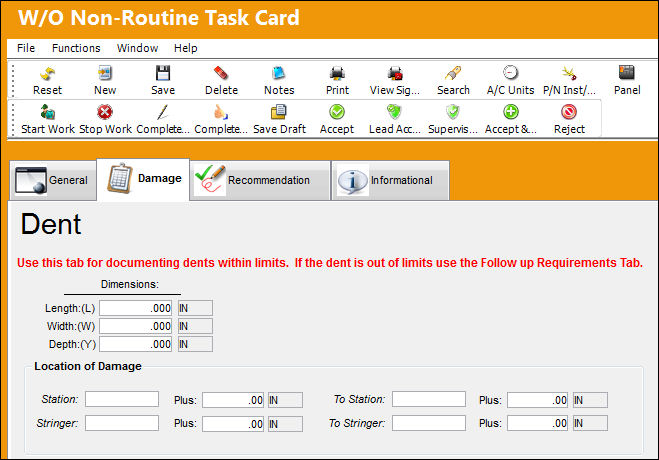
The following fields are available to describe the Dent:
_____________________________________________________________________________________
Dimensions
The size specifications of the Dent. This includes Length (L), Width (W), and Depth (Y) and can be measured through different Units of Measurement (UOM) which can be input to the right of each dimension field.
Location of Damage section
Station - To Station - The Station(s) of the aircraft. This is a physical location on the aircraft in inches from a datum point.
Plus - Enter any additional dimensional information regarding the station(s). This can be measured through different Units of Measurement (UOM) which can be input to the right of each Plus field.
Stringer - To Stringer - In aircraft construction, a Stringer (also known as Longeron) is a thin strip of wood or metal to which the skin of the aircraft is fastened.
_____________________________________________________________________________________
Share
Print
|
©1997-2026 Trax USA Corp. All rights reserved. This manual may not be copied, photocopied, reproduced, translated, or converted to any electronic or machine-readable form, in whole or in part, without prior written approval from Trax USA Corp. |
 |