
 Share
Share
 Print
Print
|
|
|
|
|


Airframe Crack:
From the General tab, 'Airframe Crack' is selected as the Damage Type.

Notice that the Damage tab reads 'Airframe Crack.'
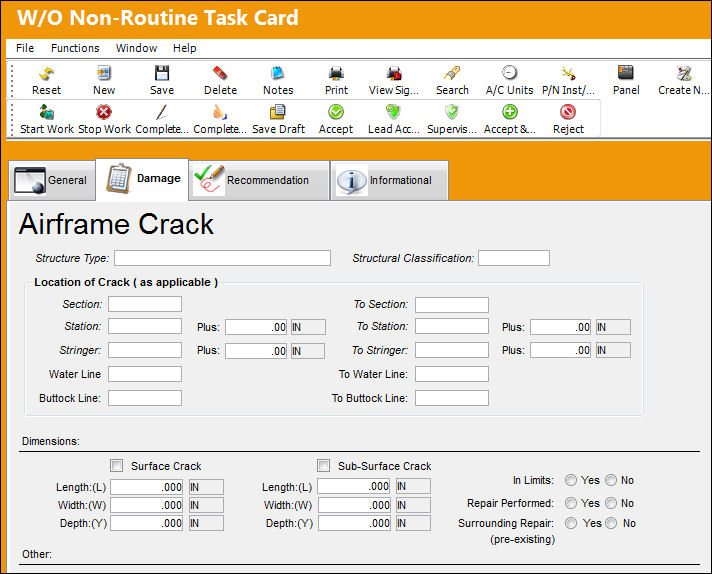
The following fields are available to describe the Airframe Crack:
_____________________________________________________________________________________
Structure Type
The user defined type of structure containing the crack.
Structural Classification
The user defined classification of the structure.
Location of Crack (as applicable) section
The same fields are covered in the Location of Damage section of the Corrosion Damage Type.
Dimensions section
Surface Crack checkbox - Indicates if the crack is on the surface.
Surface Crack Length / Width / Depth - Specify the dimensions of surface crack. These dimensions can be measured through different Units of Measurement (UOM) which can be input to the right of each dimension field.
Sub-Surface Crack checkbox - Indicates if the crack is in the sub-surface.
Sub-Surface Crack Length / Width / Depth - Specify the dimensions of sub-surface crack. These dimensions can be measured through different Units of Measurement (UOM) which can be input to the right of each dimension field.
In Limits (Yes/No) radio buttons - Select whether the crack is within allowable limits.
Repair Performed (Yes/No) radio buttons - Select the 'Yes' radio button if a repair was performed. Select 'No' if a repair was not performed.
Surrounding Repair (pre-existing) (Yes/No) radio buttons - Indicates whether any repairs were performed in the surrounding area of the crack currently being repaired.
Other section
The Other section provides users with customizable metadata fields. Each field is linked to the following Technical Records transaction code: Corrosion Metadata 1, Corrosion Metadata 2, Corrosion Metadata 3, and Corrosion Metadata 4. Each field is made available only when their respective Technical Records Switch  is set to Yes: CORRMETA1, CORRMETA2, CORRMETA3, and CORRMETA4. For more information refer to the Technical Records Switches Manual.
_____________________________________________________________________________________
Share
Print
|
©1997-2026 Trax USA Corp. All rights reserved. This manual may not be copied, photocopied, reproduced, translated, or converted to any electronic or machine-readable form, in whole or in part, without prior written approval from Trax USA Corp. |
 |