
 Share
Share
 Print
Print
|
|
|
|
|


Corrosion:
From the General tab, 'Corrosion' is selected as the Damage Type.

Notice that the Damage tab reads 'Corrosion.'
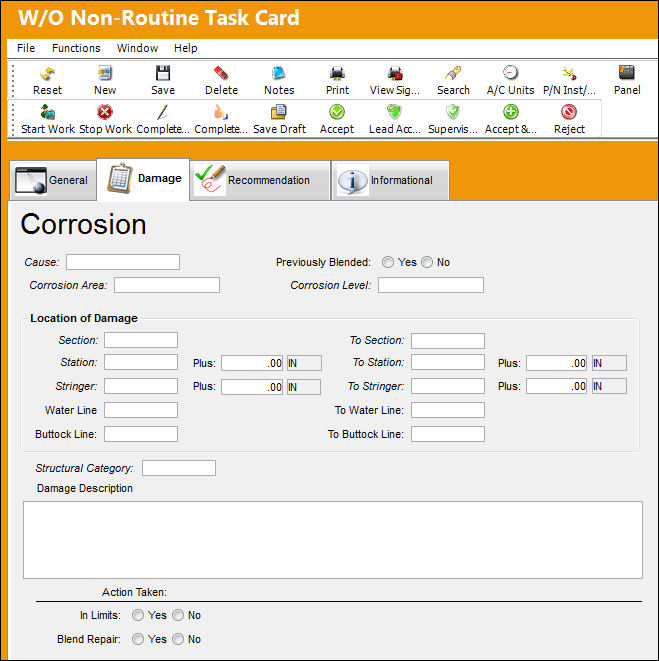
The following fields are available to describe the Corrosion:
_____________________________________________________________________________________
Cause
The reason/cause of the damage.
Previously Blended (Yes/No) radio buttons
Select the Yes radio button if the area had a previously blended repair. Select No if the area has not had a previously blended repair.
Corrosion Area
The area where the corrosion occurred.
Corrosion Level
The level of corrosion that occurred.
Location of Damage section
Section - To Section - The section(s) covering the damage area.
Station - To Station - The Station(s) of the aircraft. This is a physical location on the aircraft in inches from a datum point.
Stringer - To Stringer - In aircraft construction, a Stringer (also known as Longeron) is a thin strip of wood or metal to which the skin of the aircraft is fastened.
Plus - Enter any additional dimensional information regarding the station(s). This can be measured through different Units of Measurement (UOM) which can be input to the right of each Plus field.
Water Line - To Water Line - A horizontal line through the center of the aircraft in its flying position. Water lines are drawn parallel to one another in three to six inch intervals. This is a range between two numbers.
Buttock Line - To Buttock Line - Lines that are determined by looking at the plan view of the aircraft. A centerline of the aircraft is established and labeled 'buttock line 0.' This is a range between two numbers.
Structural Category
The Structural Category Code.
Damage Description
Enter a brief description of the damages to the aircraft. This field is copied from the N/R T/C Description field from the General tab.
Action Taken section
In Limits radio buttons - Select whether the corrosion is within allowable limits.
Blend Repair (Yes/No) radio buttons - Select the Yes radio button if there was any blending done to the repair.
If the Yes radio button is selected, the Original Material Thickness and Remaining Thickness fields become available.
Original Material Thickness - The original thickness of the material before blending. This field is only available when Blend Repair is set to Yes.
Remaining Thickness - The remaining thickness of the blended area. This field is only available when Blend Repair is set to Yes.
_____________________________________________________________________________________
Share
Print
|
©1997-2026 Trax USA Corp. All rights reserved. This manual may not be copied, photocopied, reproduced, translated, or converted to any electronic or machine-readable form, in whole or in part, without prior written approval from Trax USA Corp. |
 |