 Download Online Help
 Print
|
|
|
|
|


Location Status
At the top half of the homepage, the Location's task assignments are displayed in helpful graphs and notes are listed that accompany specific tasks for the upcoming Work Turnover.
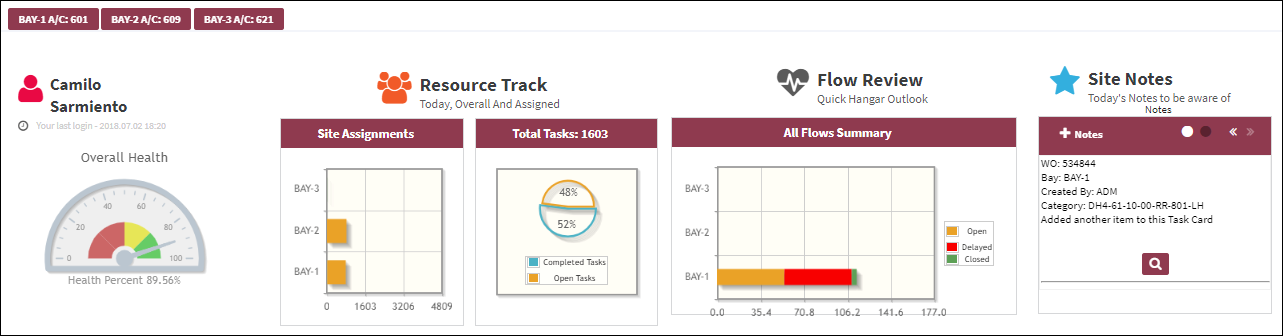
The Location Status section is composed of the following sections:
_________________________________________________________________________
User Information 
The User Information section lists the currently logged in user, their Position (from Employee Master, General tab), and their latest login information.
The following graph is also displayed:
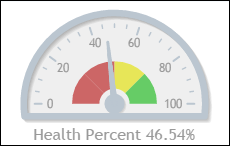
Overall Health - This graph shows the overall performance for the Location on that particular day. The gauge indicates the current percentage of completed tasks.
 = less than 50% complete
 = 50% - 75% complete
 = 75% - 100% complete
Resource Track 
The Resources Track section displays the current day's task assignments in up-to-the-minute graphs. Users can click on the graph to view the graph in a larger pop-up window. The following graphs are available:
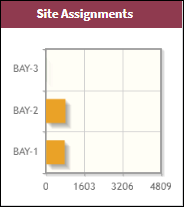
Site Assignments - This graph displays the amount of assigned and unassigned tasks for each Site in that Location. Users can hover over each bar to view the amount of tasks that are either currently assigned or unassigned.
 = Assigned
 = Unassigned
Note: W/O Task Cards and N/R Task Cards are assigned to users via the W/O Task Card Assignment window.
Note: The Assignment functionality of the Production Control application is only applicable to the Man Hours Schedule functionality, not the Head Count functionality. Planning switch  LBRBYHCNT must be set to No.
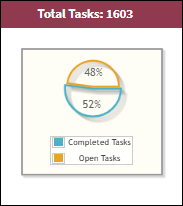
Total Tasks - This graph displays the total amount of tasks currently required in the Location/Sites and lists the current percentage of Completed versus Open tasks.
 = Completed
 = Open
Flow Review 
The Flow Review section contains a graph that covers all Flows for each Site. The graph notes the total amount of Flows and distinguishes how many are currently Closed, Open, and Delayed. For more information refer to the Flow Tab.
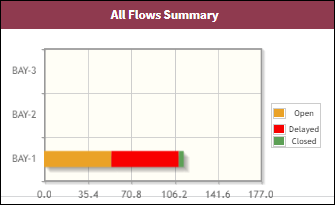
= Open Flows
= Delayed Flows
= Closed Flows
Site Notes 
From the Site Notes section of the homepage, users can add helpful notes throughout the day that can be passed on to later shifts via the Work Turnover functionality. These notes are compiled throughout the day and can be accessed by the following shifts through the Shift Handover button from the toolbar. For detailed information on this section, refer to Site Notes.
_________________________________________________________________________
Download Online Help
Print
|
©1997-2018 Trax USA Corp. All rights reserved. This manual may not be copied, photocopied, reproduced, translated, or converted to any electronic or machine-readable form, in whole or in part, without prior written approval from Trax USA Corp. |
 |