 Download Online Help
 Print
|
|
|
|
|


Home Toolbar
The Navigation Panel is displayed on the left side of the homepage, and allows the user to access any of the main windows for the application. The Navigation Panel serves as a reference point and remains open regardless of which window the user is in.
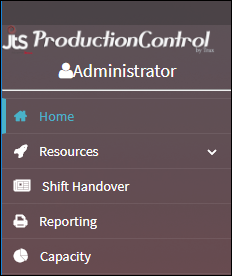
The following options are available in the main toolbar:
_________________________________________________________________________
Home  window
Select this tab to return to the homepage.
Resources  window
The Resources window contains contains the Resource Gantt  button and the Assignment
 button. These buttons help production controllers view and organize the Location's personnel. See below.
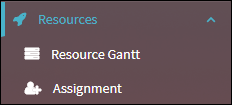
Resource Gantt  button - Select the Resource Gantt button to view a graphical display listing all of the day's Task Cards for the selected Location along with the user they are assigned to. For more information, refer to the Resource Gantt Button.
Assignment  button - Select the Assignment button to assign personnel to the selected location's tasks. For more information, refer to the Assignment Button.
Shift Handover  window
Select the Shift Handover window to create a report listing all notes added during the previous shift. These notes can include information regarding specific Work Order, Tasks, Aircraft, parts, personnel information, etc. The reports can be filtered for different sorts of information and then printed or emailed as needed. Notes can be added from various windows in the app, including from the Site Notes section of the homepage. For more information, refer to the Shift Handover Button.
Reporting  window
Select the Reporting window to generate various reports containing maintenance information for the specific Location/Site. For more information, refer to the Reporting Button.
Capacity  window
Select the Capacity window to view all of the Site capacities for a Location. For more information, refer to the Capacity Button.
_________________________________________________________________________
Download Online Help
Print
|
©1997-2018 Trax USA Corp. All rights reserved. This manual may not be copied, photocopied, reproduced, translated, or converted to any electronic or machine-readable form, in whole or in part, without prior written approval from Trax USA Corp. |
 |