
 Share
 Print
|
|
|
|
|


A/C Out of Service Summary Panel, via A/C Controller Panel (v8.1)
The A/C Out of Service Summary Panel displays all aircraft that are currently Out of Service.
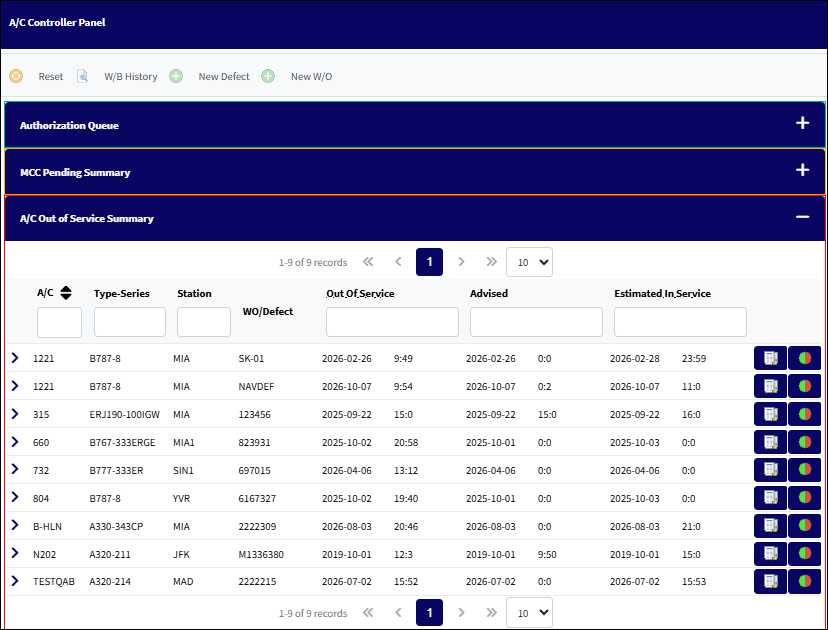
The following information/options are available in this window:
_____________________________________________________________________________________
Expand  button
Click to see more information for the Aircraft. Click it again to collapse the expanded information.
Status 
The current flight status of the A/C.
A/C
The individual aircraft tail number.
Type-Series
The Aircraft Type and Series/Fleet assignment.
Station
The station at which the aircraft was placed Out of Service.
WO/Defect
The Work Order or Defect associated with the aircraft.
Out of Service
The date and time that the aircraft went out of service for required maintenance.
Advised
The date and time that the discrepancy was reported. The default is the time that the Defect Report is being created and can be edited as required.
Estimated in Service
The date and time that the aircraft will be placed back in service.
Open WO or Defect  button

Select this button to route to the associated W/O or Defect.
A/C Out of Service  button
Select this button to view the A/C Out of Service pop up window. For more information, refer to OOS button, via A/C Controller Panel.
_____________________________________________________________________________________
Share
Print
|
©1997-2026 Trax USA Corp. All rights reserved. This manual may not be copied, photocopied, reproduced, translated, or converted to any electronic or machine-readable form, in whole or in part, without prior written approval from Trax USA Corp. |
 |