
 Share
 Print
|
|
|
|
|


Authorization Queue Panel, via A/C Controller Panel (v8.1)
The Authorization Queue Panel displays all Defects that are pending authorization in the system.
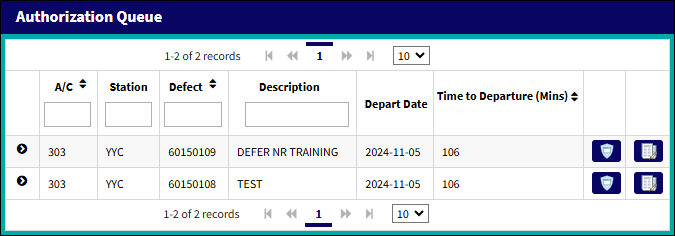
The following information/options are available in this window:
_____________________________________________________________________________________
A/C
The individual aircraft tail number.
Station
The station where the defect was worked on.
Defect
The defect number (or log book number).
Description
The description of the defect which describes the problem found or notes the service being performed.
Depart Date
The date the A/C is scheduled to depart on its flight.
Time to Departure (Mins)
The time, in minutes, that the aircraft is set to depart.
Authorization  button
Select this button to authorize the defect within the A/C Controller Panel window.
Defect Detail  button
Select this button to display the detail view of the Defect Report. For more information, refer to Defect Report Detail, General Tab.
_____________________________________________________________________________________
Authorizing a Defect in the Authorization Queue Panel
Users can use the Authorization button to authorize the pending Defects in the Authorization Queue panel.
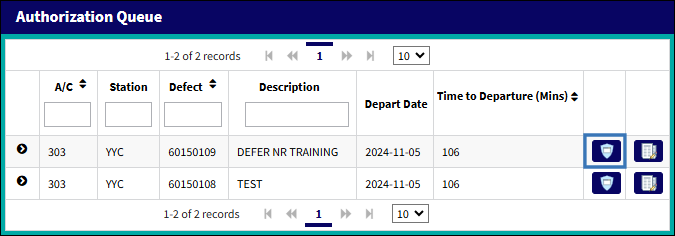
 Note: This button is security-controlled via Technical Records/ Update/ Defect Report Defer Authorization. For more information refer to Security Explorer via System Administration.
Selecting the button will prompt the Defect Authorization pop up window.
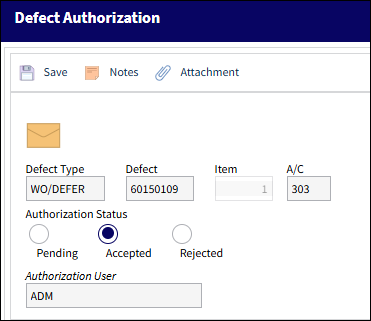
The following information/options are available in this window:
_____________________________________________________________________________________
Defect Type
The type of defect found on the aircraft (for example, Pilot Report, MX Report).
Defect
The defect number (or log book number).
Item
The Defect's specific Item number.
A/C
The individual aircraft tail number.
Authorization Status radial buttons
Pending - The Pending option rejects the Authorization Step.
Accepted - This option, when selected, will accept the record and authorize it upon saving.
Rejected - This option is selected when the user is rejecting the Authorization Step when there are reasons that do not permit the step from remaining open or being accepted. The Rejection Reason field is mandatory upon the Authorization Step becoming Rejected.
Authorization User
The user authorizing the defect.
_____________________________________________________________________________________
Select the appropriate authorization status and select the save button.
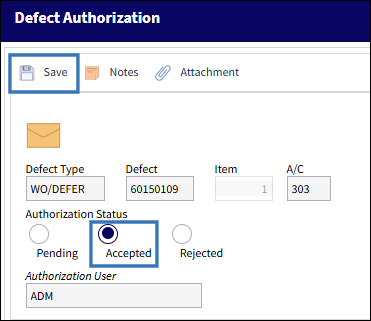
If accepted, the Defect will appear in the Deferred Defects panel.
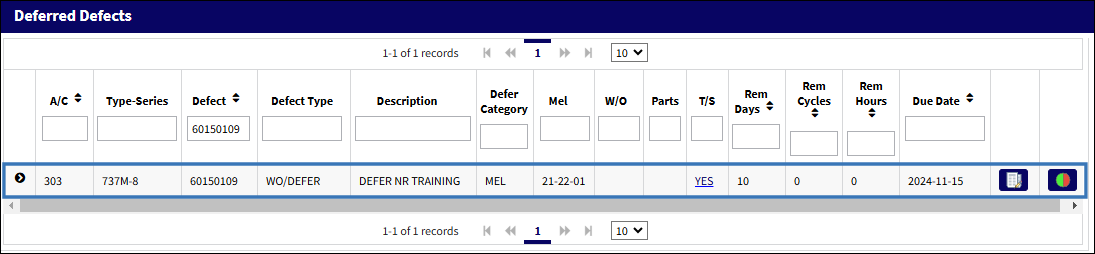
Note: The Open Defects Panel has been renamed to the Deferred Defects Panel.
Share
Print
|
©1997-2026 Trax USA Corp. All rights reserved. This manual may not be copied, photocopied, reproduced, translated, or converted to any electronic or machine-readable form, in whole or in part, without prior written approval from Trax USA Corp. |
 |