
 Share
 Print
|
|
|
|
|


Open W/O Panel, via A/C Controller Panel (v8.1)
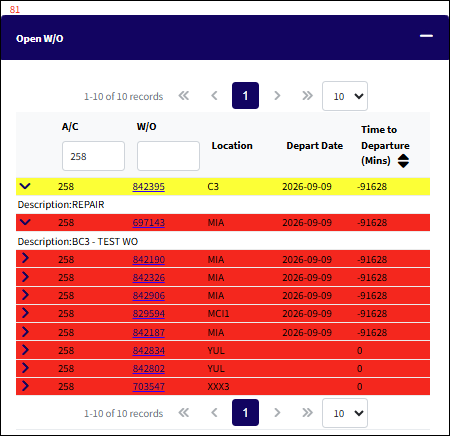
The Open W/O Panel displays all W/Os that have an associated flight departing the same day the A/C Controller Panel is accessed. W/Os highlighted in red indicate the A/C's Time to Departure is Overdue.
Note: The Work Order records in the Open W/O Panel are highlighted in red for W/Os in Open Status and in yellow for W/Os in Completed Status. Use the arrow for a brief description of the W/O.The records on this panel can be displayed in groups of 5, 10, 20, or all at once.
 Note: TheSwitch
 ACCRTPANELWO controls the Open W/Os displayed on the A/C Controller Panel. For more information refer to ACCRTPANELWO in the Technical Services Switch training manual.
Note: The amount of time that passes before the Time to Departure is considered Overdue and is controlled by Switch ACCPRR's Config Other field. If a specific value is not entered, then the Config Other field defaults to the value of 30 (i.e., 30 Minutes).
The following information/options are available in this window:
_____________________________________________________________________________________
A/C
The individual aircraft tail number.
W/O
The Work Order used to categorize, manage, and schedule work requirements for aircraft maintenance.
 Note: W/Os displayed in the Open W/O panel, hyperlink to their corresponding W/O window in the Production Module.
Location
The Location for maintenance events, inventory stores, orders, transactions, or training events.
Depart Time
The date in which the aircraft is expected to depart.
Time to Departure (Minutes)
The amount of time (in minutes) left until the aircraft departs. A negative number represents the amount of time that has passed (in minutes) since the aircraft should have departed.
_____________________________________________________________________________________
Share
Print
|
©1997-2026 Trax USA Corp. All rights reserved. This manual may not be copied, photocopied, reproduced, translated, or converted to any electronic or machine-readable form, in whole or in part, without prior written approval from Trax USA Corp. |
 |