
 Share
 Print
|
|
|
|
|


Task Cards Tab, via W/O (Planning Control)

The Task Cards tab lists all Task Cards that are associated with the W/O.
From this tab planners are able to see the status of each Task Card. Planners also have the option to Exchange, Transfer, Cancel and Delete Task Cards using the respective buttons (described below).
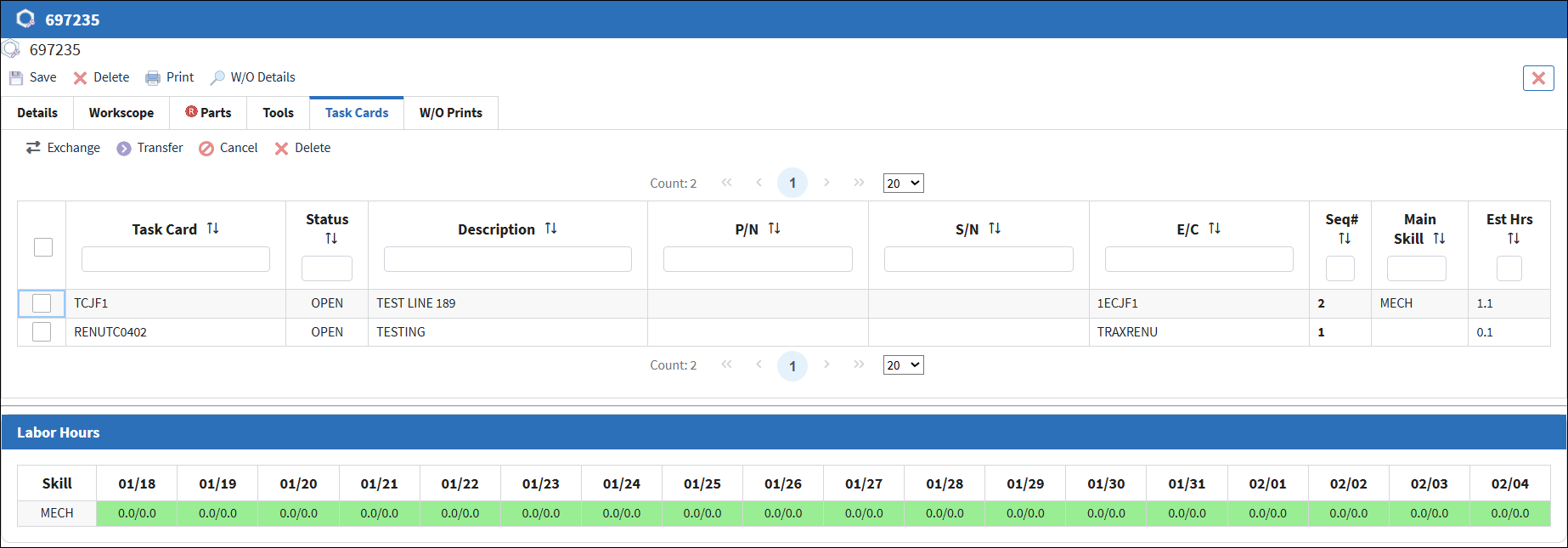
The following information/options are available in this window:
_____________________________________________________________________________________
Exchange  Button

Select to replace a Task Card with the latest revision of the Task Card linked to the W/O.
Transfer  Button
Select to transfer the Task Card from one W/O to another and remove from the current W/O.
Cancel  Button
Select to cancel a Task Card from the W/O.
Delete  Button
Select to remove the Task Card from the W/O.
Task Card
The Task Card / Job Card that details the scheduled maintenance work.
Status
The Status of the Task Card.
Description
Description of the Task Card.
P/N
The Part Number reference for the aircraft part.
S/N
The Serial Number for the specific serialized part.
E/C
The E/C reference the Task Card was associated to (if applicable).
Seq#
The sequence number of the Task Card. This field remains static while the user scrolls to the right. This enables the user to view this information in the Task Card tab at all times.
Main Skill
The primary Skill required of an employee to complete the task.
Est Hrs
The estimated amount of man hours required to complete the task.
_____________________________________________________________________________________
Share
Print
|
©1997-2026 Trax USA Corp. All rights reserved. This manual may not be copied, photocopied, reproduced, translated, or converted to any electronic or machine-readable form, in whole or in part, without prior written approval from Trax USA Corp. |
 |