
 Share
 Print
|
|
|
|
|


SDC Query, via Planning Control

The SDC Query window displays Standard Duty Cycle (SDC) data/records specifically for Rolls-Royce Engines that were imported from the QOCO system. Rolls-Royce Engine usage information is exported from eMRO/TRAX into the QOCO system via interface. Then, once the information is managed and updated by the QOCO system, the SDC information is imported into the SDC Query windows in Planning Control and eMRO/TRAX.
Note: This functionality is part of a Rolls-Royce Engine interface and is therefore not available for all operators.
The QOCO application is set to improve engine reliability, troubleshooting, and overhaul turnaround times. Furthermore, the application tracks flight cycles, providing accurate values for Life Limited Parts (LLPs). Each LLP must have documented traceability from initial installation to permanent removal/retirement.
In Planning Control, select an Engine S/N to open the engine SDC status window.
- The Current Status section shows the Aircraft, Date, Position, TLP, Remaining Life (EFC) in cycles, Position, TSN, CSN, and ESN.
- The Last Verified Flight shows the Date, TLP, Rating, TSN, CSN, and CSN Limit.and Estimated CSN Limit (as of the last verified flight).
- The Limiting Part section shows the ATA, Description, Used Life (SDC), Remaining Life (SDC), Estimated Remaining Cycles, and Usage Rate, and the DAC version of the part that limits the engine.
Below the panels, every life-limited part on the engine is listed with CSN, cycles at rate, Used Life (SDC), Defined Life (DSCL), Remaining Life (SDC), Usage Rate and Estimated Remaining Life. The planner can see the cycle-based and DACs-based lives on the same row and can identify the limiting part immediately.
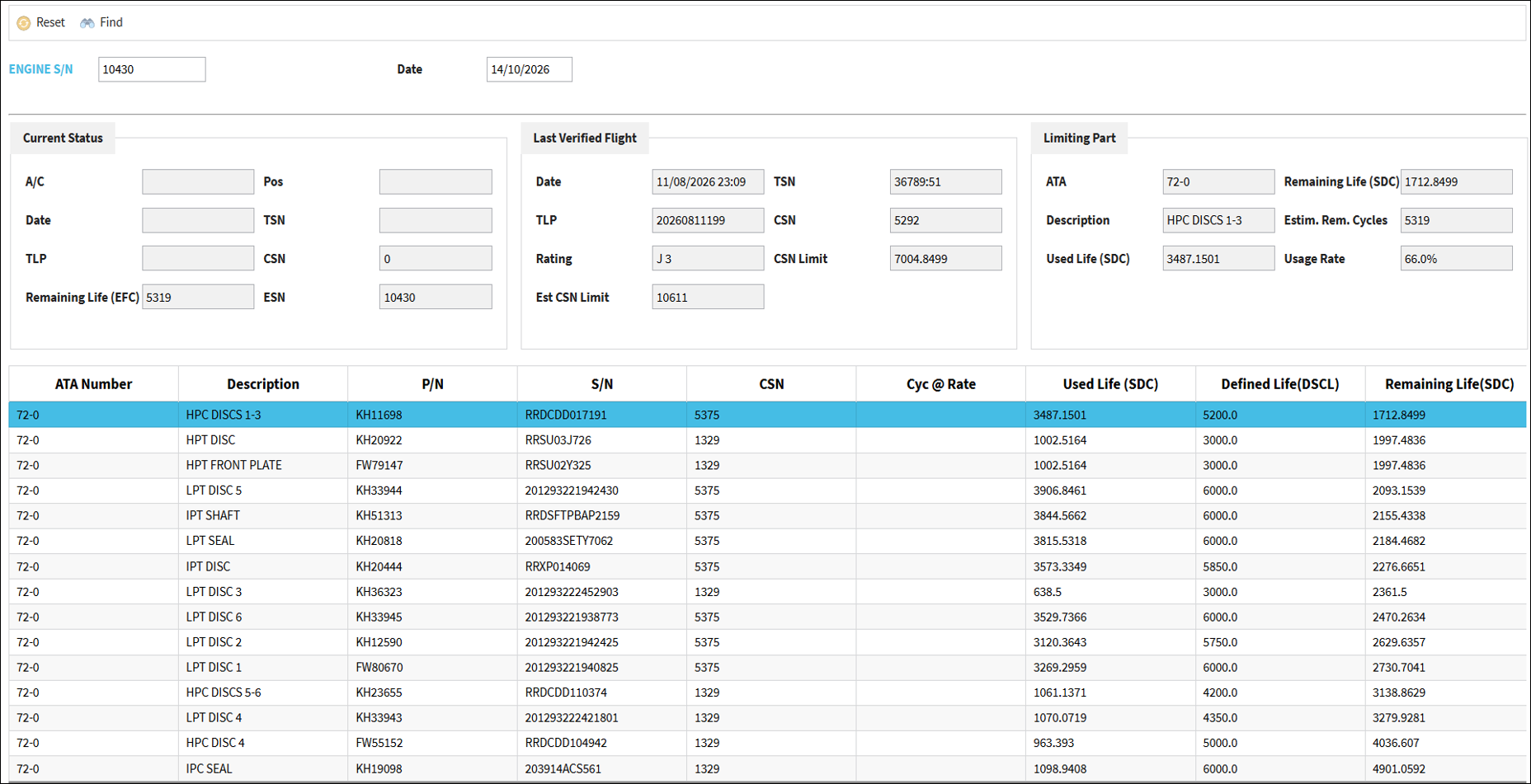
Note: SDC information is only displayed in this window for Rolls-Royce engines (and their subcomponents) that are configured to be sent to the QOCO app via interface. To be included in the export, these engines must have the DAC Engine checkbox selected in the P/N Master, via the Technical Engineering tab. The engine data that is exported to QOCO from the Trax system is later imported back into the SDC Query window via interface with the latest SDC details/calculations.
For more information on the fields available in this window, refer to the SDC Query window in the Planning training manual.
Share
Print
|
©1997-2026 Trax USA Corp. All rights reserved. This manual may not be copied, photocopied, reproduced, translated, or converted to any electronic or machine-readable form, in whole or in part, without prior written approval from Trax USA Corp. |
 |