
 Share
Share
 Print
Print
|
|
|
|
|


Shop W/O Non-Routine Creator Release for Authorization
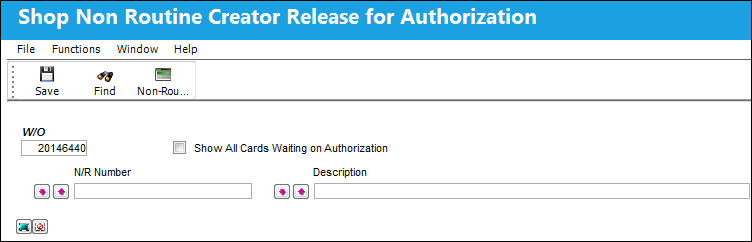
From the Shop W/O Non-Routine Creator Release for Authorization. users who created a Non-Routine Task Card can authorize their pending N/R T/Cs. For detailed information of the N/R Express authorization processes, refer to the Non-Routine Express Authorization Process via the Shop Training Manual.
 This functionality was designed as specified by a TRAX customer. The procedures intended through this functionality are part of their customized program and therefore cannot be modified by any other TRAX customer.
Only the user who created the Non-Routine Task Card can see the N/R T/C from this window. If a N/R T/C has to be authorized by a user who did not create it, the authorizer will have to access the N/R T/C from the N/R Express window and must select the Accept  button. For more information refer to the Accept Button, via Non-Routine Express in the Shop Training Manual.
 This window is security-controlled via Shop/ Update/ Shop W/O Non-Routine Release for Authorization. For more information refer to the Security Explorer via the System Administration Training Manual.
The following information/options are available in this window:
_____________________________________________________________________________________
W/O
The Work Order used to categorize, manage, and schedule work requirements for aircraft maintenance.
N/R Number
The pending Non-Routine Task Card number.
N/R Number Sort radio buttons
Allows users to sort the queried Non-Routines. The options are ascending (ASC), descending (DEC), or None.
Description
The Description of the N/R T/C. This field uses a 'like' search function.
Description Sort radio buttons
Allows users to sort the queried Non-Routine Descriptions. The options are ascending (ASC), descending (DEC), or None.
Select All  / Deselect All
  buttons
Each buttons allows users to select all listed Non-Routines for authorization or to deselect all listed Non-Routines.
_____________________________________________________________________________________
When the required N/R T/C is queried, the result(s) are displayed as follows.
To accept, select the Accept radio button then select the Save  button.
Once authorized, the formerly pending N/R T/C is no longer listed in the window.
From the N/R Express window, notice that the N/R T/C has been authorized and is in Open status.
Share
Print
|
©1997-2026 Trax USA Corp. All rights reserved. This manual may not be copied, photocopied, reproduced, translated, or converted to any electronic or machine-readable form, in whole or in part, without prior written approval from Trax USA Corp. |
 |