
 Share
Share
 Print
Print
|
|
|
|
|


Interactive Planner, Unschedule Tasks Tab

The Interactive Planner, Unschedule Tasks tab shows all planning events that will be due against the selected tail numbers that are not currently attached to a Work Order.
The display is very similar to the Display By Area, via the Aircraft tab. The main difference is that in this area E/Cs are displayed rather than Work Orders. All functions from the Display Control Area are available.
E/Cs that are displayed in the Unschedule Tasks tab can be attached to the Work Order selected in the Display By Area.
Select a maintenance event. The E/C will then disappear from the Unscheduled Task Area (because it is attached to a Work Order now). It can still be viewed in the Planning Query Button, via the Selected Work Area.
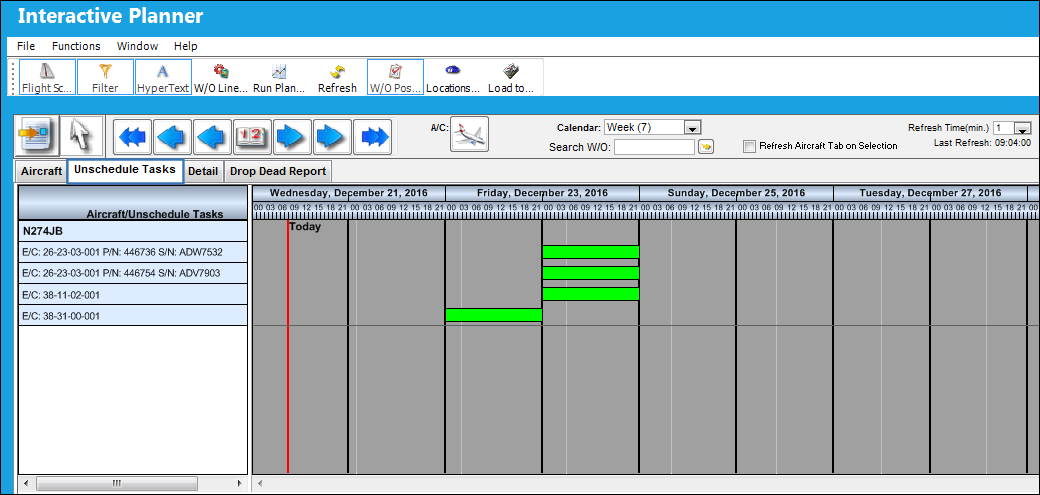
This view also allows users to move a maintenance event to an earlier date than scheduled. Select a maintenance event and drag it to an earlier due date.
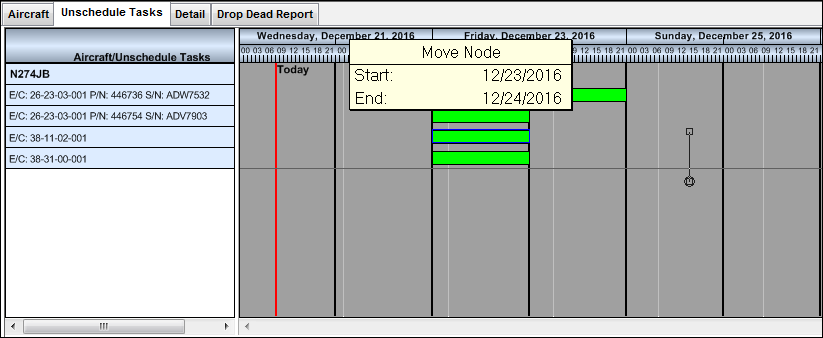
The highlighted maintenance event is now due on December 21st, rather than on December 23rd.
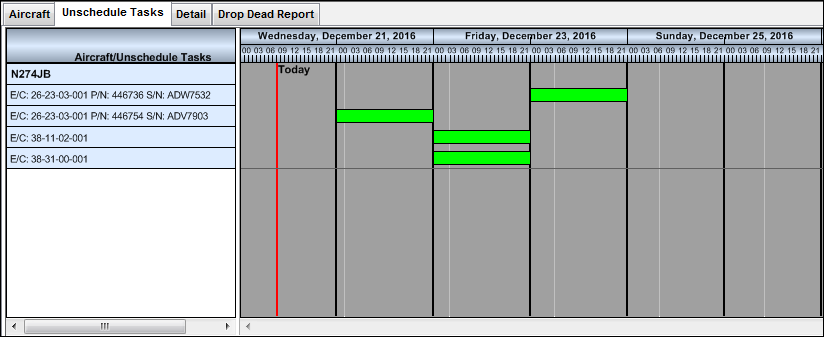
Note Maintenance events cannot be moved to a later due date.
Share
Print
|
©1997-2026 Trax USA Corp. All rights reserved. This manual may not be copied, photocopied, reproduced, translated, or converted to any electronic or machine-readable form, in whole or in part, without prior written approval from Trax USA Corp. |
 |