
 Share
Share
 Print
Print
|
|
|
|
|


The AWB (Airway Bill)/Expedite  button allows the user to view/edit Airway Bill information related to an order.
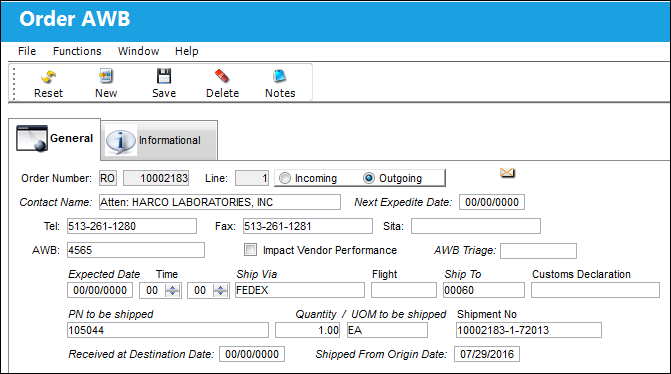
The following information/options are available in this window:
_____________________________________________________________________________________
Order Number
The type of order and the order number for the transaction.
Line
The specific Line item of the Order. Each Line item could represent a different part included in the same order.
Incoming/Outgoing radio buttons
Indicate whether the AWB is created for an order that is incoming from a customer or outgoing to a customer.
Contact
Main contact at the organization.
Next Expedite Date
The next expedite date for this airway bill.
Tel
Contact's telephone number.
Fax
Contact's facsimile number.
SITA
The SITA identification.
AWB
The airway bill number related to the part.
Impact Vendor Performance
Check this box to indicate that the Vendor's performance should be impacted as a result of the AWB as defined in the Settings/Explorer/System Transaction Codes under the Vendor Performance section of the Settings Module.
AWB Triage 
Associates a triage code to an AWB/Order combination. This is set up through the Order AWB Triage System Tran Code and can be set to have a notification sent after going through an AWB Pre-Receiving Scan.
This field is only available with Switch  ORDAWBTRIAGE set to Yes.
Expected Date
The expected delivery date of the AWB.
Time
The expected delivery time of the AWB.
Ship Via
Ship Via code and method to be used.
Flight
The flight reference number/information.
Ship To
Ship Via code and method to be used.
Customs Declaration 
The customs declaration number used to itemize the goods being brought into the country through customs procedures. This is a free text field and informational only.
PN to be shipped
The part number reference to be shipped.
Qty to be shipped
The quantity of the part(s) to be shipped.
UOM to be shipped
The unit of measure of the part number to be shipped.
Shipment No
The shipment reference number.
Received at Destination Date
The date the airway bill was received at it's destination.
Shipped From Origin Date
The date the airway bill was shipped from its origin.
 This field is also used to calculate the Expected Date for an order when Switch SPEC2KEXP_DATE is set to Yes. When set to Yes, the following formula will be used for incoming messages: Shipped From Origin Date + Default Shipping Days = Expected Date
 When used with Switch SPEC2KEXP_DATE, this field is part of an interface and is only available for customers using this interface. For additional information, refer to Switch SPEC2KEXP_DATE via the Orders Switches Manual.
_____________________________________________________________________________________
Share
Print
|
©1997-2026 Trax USA Corp. All rights reserved. This manual may not be copied, photocopied, reproduced, translated, or converted to any electronic or machine-readable form, in whole or in part, without prior written approval from Trax USA Corp. |
 |