
 Share
Share
 Print
Print
|
|
|
|
|


Select the Control  button to view (only) the control properties of this part:
The screen shows information about existing time controls, as well as their actuals, remaining, and to-go time.
This screen is a query mode only. Changes can only be made in Settings/Update/P/N Master.
For information regarding the Control  button, refer to the Control Button via Inventory Transaction Buttons which can be found in the Inventory Training manual.
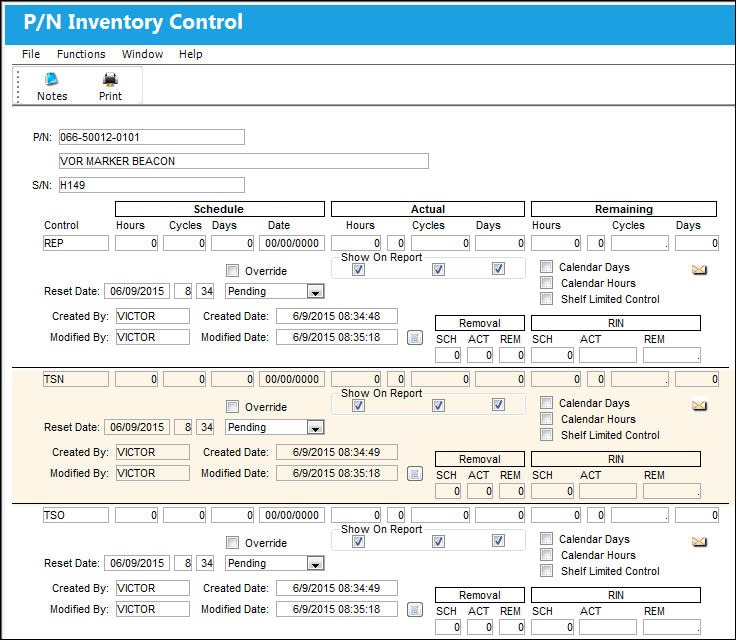
The following information/options are available in this window:
_____________________________________________________________________________________
P/N
The Part Number reference for the aircraft part.
S/N
The Serial Number for the specific serialized part.
Control
The time control related to the part (e.g., TSN, TSO, etc.) used to define its limits.
Schedule Hours/Cycles/Days
The control's hours/cycles/days schedule, as applicable.
Actual Hours/Cycles/Days
The number of hours/cycles/days accumulated against the time control schedule.
Remaining Hours/Cycles/Days
The amount of hours/cycles/days remaining against the scheduled amount.
Override checkbox
This checkbox is selected in the case of an override schedule.
Reset Date
Date and time at which control information was reset for having been performed/complied.
Show on Report checkboxes
The Show On Report checkboxes can be checked to have the hours/cycles/days appear on certain technical records and inventory reports. It is recommended to keep the checkboxes checked (as defaulted) in order to maintain as much information about the part received as possible.
Calendar Days checkbox
This is selected to activate Calendar Control on this part. Calendar selected items are “Days by the calendar,” regardless of whether installed on aircraft or not. If calendar control is selected, the system will block the other time parameters for that entry by graying out the appropriate fields.
Calendar Hours checkbox
This checkbox is selected if the P/N Control Schedule is by calendar hours instead of flight hours.
Shelf Limited Control checkbox
This checkbox is selected when the shelf life of a part is being tracked while in inventory. When a part is installed on an aircraft, the Shelf Limited Control will not appear in the P/N Inventory Control window. The reset date will be deleted and the actuals will reset to zero. Once the part is removed from the aircraft, the Reset Date of the Shelf Limited Controls is set to the Removal Date. Tracking will begin upon the Removal Date.
Created By
The user who created the record.
Created Date
The date the record was created.
Modified By
The user who last modified the record.
Modified Date
The date the record was last modified.
Removal
The Removal Schedule allows for a method of tracking tire removal information. Upon removal from the aircraft this number will automatically increment for each removal. At Receiving, the Removal Schedule information will appear, can be edited as required or reset with the reset of the P/N Control. Security access to this feature must be granted. The Removal Schedule information can also be updated via Technical Records/ Update/ P/N Control Adjustment.
Authorized By
The user who authorized the record.
Authorized Date
The date the record was authorized.
RIN SCH/ACT 
The Retirement Index Number. This number defines the Concession Maximum Value, or life limits, for rotor wing aircraft (e.g., Helicopters).
_____________________________________________________________________________________
The screen shows information about existing time controls, as well as their actuals, remaining, and to-go time.
This screen is a query mode only. Changes can only be made in Settings/Update/P/N Master.
Share
Print
|
©1997-2026 Trax USA Corp. All rights reserved. This manual may not be copied, photocopied, reproduced, translated, or converted to any electronic or machine-readable form, in whole or in part, without prior written approval from Trax USA Corp. |
 |