
 Share
Share
 Print
Print
|
|
|
|
|


The Cancel  button allows the user to cancel a line item without having to delete it. By canceling the line item, the status changes from 'Open' to 'Cancel', however the line item is still available in the Detail of the Repair Order.
 The Cancel button is security controlled via Orders/ Update/ Repair Order. for additional information, refer to the Security Explorer via the System Administration Training Manual. Even with security access to the Cancel button, if the Delete
  button is also available via the Repair Order Detail, the Cancel button will be overridden and the user will not be able to cancel any line items.
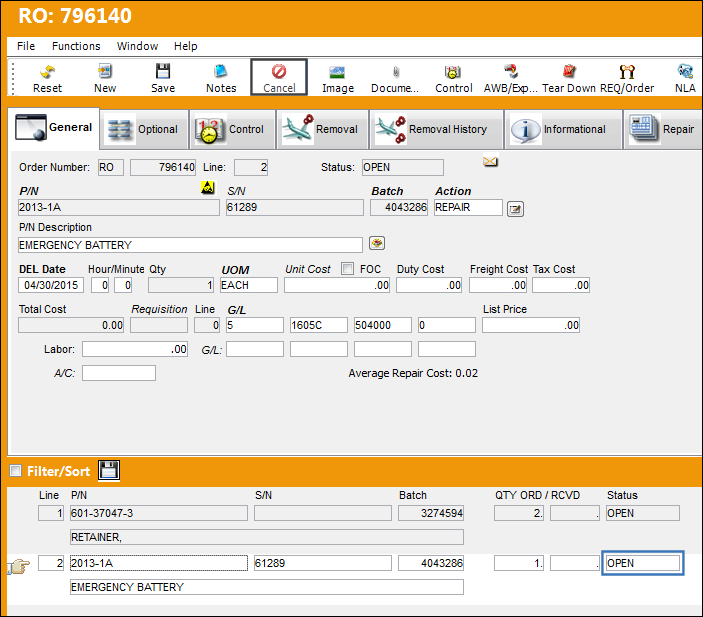
From the Repair Order Detail, select the Cancel button.
Notice that the status of line item 2 is 'Open.'
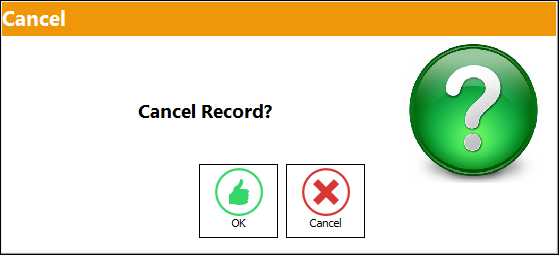
The Cancel Record pop-up appears. Select 'OK' to continue with the cancel transaction of the line item.
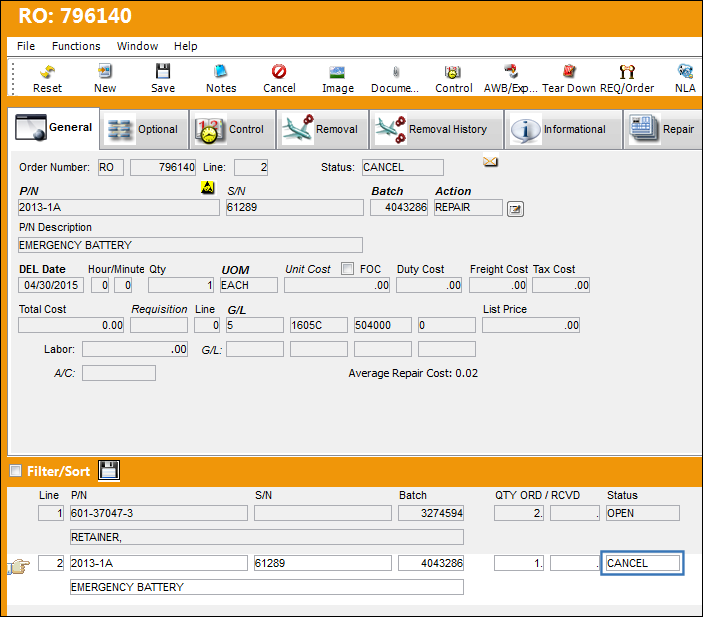
Line item 2 is still available in the Repair Order Detail, however the status has been updated to 'Cancel.'
Share
Print
|
©1997-2026 Trax USA Corp. All rights reserved. This manual may not be copied, photocopied, reproduced, translated, or converted to any electronic or machine-readable form, in whole or in part, without prior written approval from Trax USA Corp. |
 |