
 Share
Share
 Print
Print
|
|
|
|
|


The Status All  button is used to change a group of Task Cards from one status to another (e.g., from Open to Closed). This provides a quick alternative to closing each Task Card individually.
From the Shop W/O T/C Work window, select the Status All button. The below W/O Task Card pop up window appears. Using the From Status drop down, select the current status the Task Cards are in that need to be changed. Then, using the To Status drop down, select the status the Task Cards need to be changed to and enter the applicable date and time.
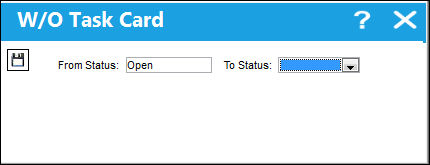
The name of the date field will correspond to the status selected from the To Status drop down.
The Shop Work Order status will not change to Completed until every Task Card has been actioned (closed, canceled, deferred).
Share
Print
|
©1997-2026 Trax USA Corp. All rights reserved. This manual may not be copied, photocopied, reproduced, translated, or converted to any electronic or machine-readable form, in whole or in part, without prior written approval from Trax USA Corp. |
 |