
 Share
Share
 Print
Print
|
|
|
|
|


The Manual Labor, or Labor Mnl,  button allows the user to add time (labor) to a selected Task Card Item for any employee. This window is not user specific. This function can also be used to edit the time that it took to carry out the Task Card Item. This window keeps a record of every user that has put time against a Shop Work Order Task Card Item, and allows the user to specify the Category of time and whether the time entry is manual.
When the Manual Labor is being applied to a Task Card Item of '0,' the information will apply to all Items associated to the Task Card.
From the Shop W/O Task Card window, select the Manual Labor button. The following window will appear. If work had previously been conducted against the Item, this information will be available. To enter new time (labor), select the New  button:
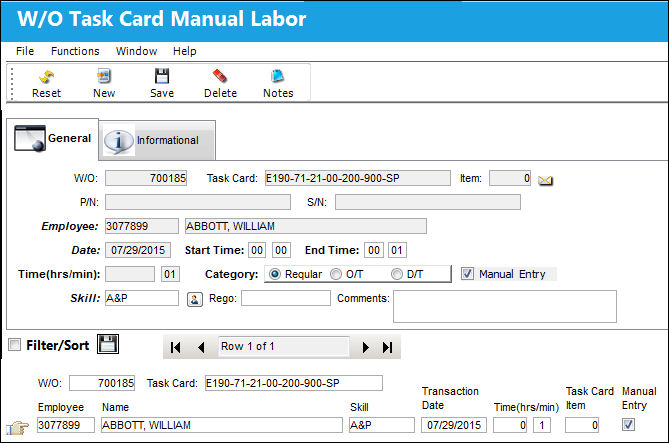
The following information/options are available in this window:
_____________________________________________________________________________________
W/O
The Work Order used to categorize, manage, and schedule work requirements for aircraft maintenance.
Task Card
The Task Card / Job Card that details the scheduled maintenance work.
Item
The individual Item number that manual labor has been added to. Users can assign manual labor to specific Task Card Items. Notice the Item field above and the Task Card Item field below are linked. When the Item number is '0,' the manual labor will apply to all of the Items.
P/N
The Part Number reference for the aircraft part.
S/N
The Serial Number for the specific serialized part.
Employee
The employee performing the task.
Date
The date of the task.
Start Time
The time the labor started on the Task Card.
End Time
The time the labor ended on the Task Card.
Time (hrs/min)
The amount of time to be manually added. The maximum number of hours that can be input here is defined using the Production Switch  LABORTIM.
Category
Regular, Overtime, or D/T (Double time).
Manual Entry
This checkbox indicates that the manual labor is being recorded manually by a user.
Skill
The appropriate skill used to perform the task.
Rego 
This free-text field is used to indicate that the work is being re-done. If the required work was completed once, and must be re-done, this field along with the Comments field may be used as desired. This field is informational only.
Comments
This is a free text field where the user may enter any additional Rego comments. This field is informational only.
_____________________________________________________________________________________
Share
Print
|
©1997-2026 Trax USA Corp. All rights reserved. This manual may not be copied, photocopied, reproduced, translated, or converted to any electronic or machine-readable form, in whole or in part, without prior written approval from Trax USA Corp. |
 |