
 Share
Share
 Print
Print
|
|
|
|
|


Select the Panel  button to enter the specific panels required to be removed to carry out the task. These will later be used to produce an access panel removal sheet on a Work Order. Panels can be validated against data in the Task Card Control Master (as per switch on the system).
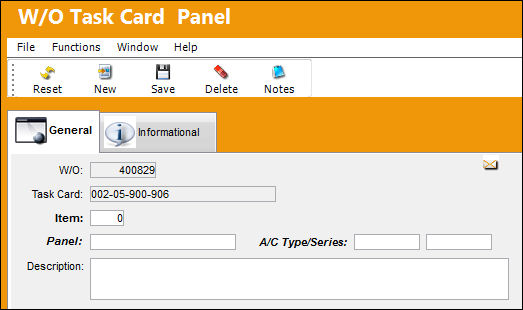
The following information/options are available in this window:
_____________________________________________________________________________________
Work Order
The Work Order used to categorize, manage, and schedule work requirements for aircraft maintenance.
Task Card
The Task Card / Job Card that details the scheduled maintenance work.
Item
The item number required to accomplish a Task Card.
Panel
The Panel reference to be removed for access.
A/C Type/Series
The Aircraft Type and Series/Fleet assignment.
Description
The Panel description information.
_____________________________________________________________________________________
Additional information can be viewed through the W/O Task Card Panel, Informational Tab.
Share
Print
|
©1997-2026 Trax USA Corp. All rights reserved. This manual may not be copied, photocopied, reproduced, translated, or converted to any electronic or machine-readable form, in whole or in part, without prior written approval from Trax USA Corp. |
 |