
 Share
Share
 Print
Print
|
|
|
|
|


The Cancel Queue button allows the user to view a list of all canceled picklists. When the Click to Mark as Reviewed
  button is selected, a canceled picklist has been reviewed and will be removed from the Picklist Cancel window. Canceled picklists can still be viewed via the Picklist Query.
Note: The Cancel Queuebutton only appear when switch  PCKLISTCAN is set to Yes.
Select the Cancel Queuebutton. The Picklist Cancel window will be displayed.
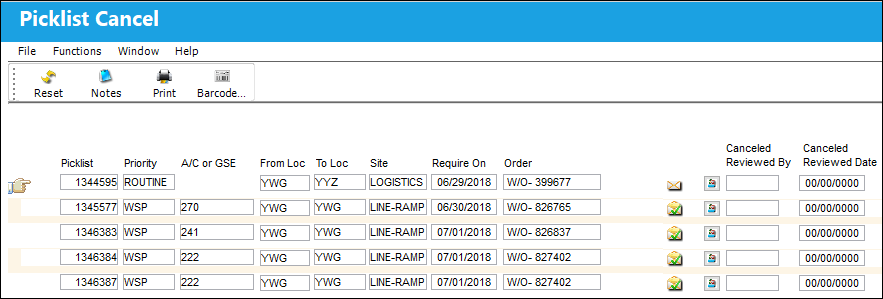
The following information/options are available in this window:
_____________________________________________________________________________________
Picklist
List of reserved components for a maintenance event or for transfer.
Priority
The level of importance placed on the need for a part. Notification based on the requisition priority may be defined by location.
A/C GSE
Aircraft or Ground Service Equipment.
From Loc
The inventory location the user wants to issue parts from.
To Loc
The inventory location the user wants to issue parts to.
Site
The Site where the work is to be carried out (if applicable).
Require On
The date the picklist is required.
Order
The Work Order the part/picklist is attached to.
Click to Mark as Reviewed button
Select this button to remove a canceled picklist from the cancel queue. Selecting this button indicates that a canceled picklist has been reviewed, and can therefore be removed from this queue. A picklist that is removed from the canceled queue, can still be viewed from the Picklist Query window.
_____________________________________________________________________________________
Share
Print
|
©1997-2026 Trax USA Corp. All rights reserved. This manual may not be copied, photocopied, reproduced, translated, or converted to any electronic or machine-readable form, in whole or in part, without prior written approval from Trax USA Corp. |
 |