
 Share
Share
 Print
Print
|
|
|
|
|


The Transfer Picklist option is used to transfer a picklist from one location to another. This is used if a mechanic requested a part that is only obtainable from another inventory location. A Transfer Picklist will create the Transfer Order for all requested parts and once the parts are received at the mechanic’s location, the picklist is ready for issue. One example is where an A-Check is scheduled to be done off-site and stores wants to transfer all pre-draw parts to that location with picklists ready for issue.
From the Picklist Issue Selection window, select the Transfer Picklist checkbox.
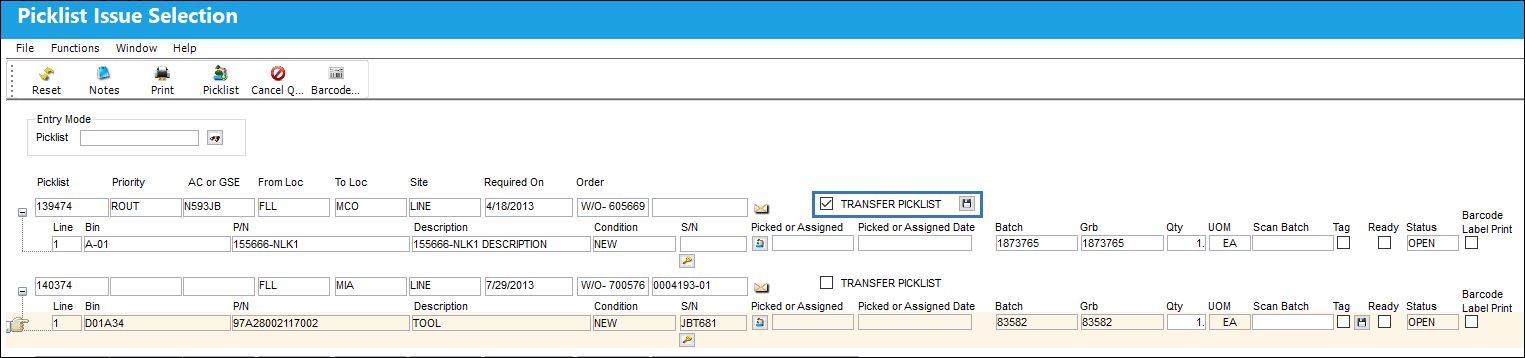
The Save button will appear. Select the Save button.
The Transfer Order screen will appear. Enter the relevant information and select the Save button.
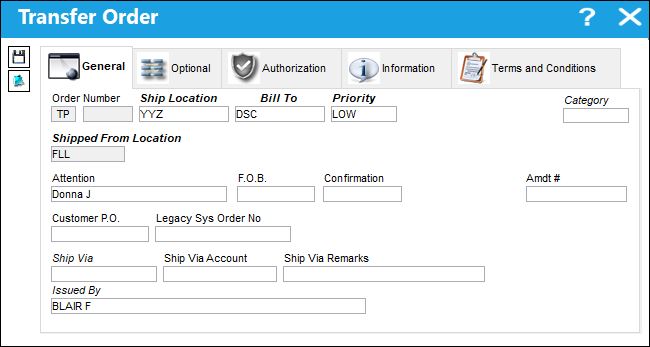
The following information/options are available in this window:
_____________________________________________________________________________________
Order Number
The type of order and the order number for the transaction.
Ship Location
The location where the transaction will be shipped to. All locations are defined in the Location Master. All Ship Locations must be identified as an Inventory Location in the Location Master, if a physical part or item is to be received. If the Location is not identified in Inventory a warning will be received upon entry and the user will not be able to save the order header.
Bill To
Billing code (e.g. client who will pay the bill).
Priority
The level of importance placed on the need for a part. Notification based on the requisition priority may be defined by location. These codes are defined in the Priority System Transaction Code.
Category
The appropriate category for this transaction. This also works with the Authorization Process as defined against the Order Type.
Shipped From Location
Location from which order has been shipped.
Attention
Name of person who should receive the order.
F.O.B
Freight On Board information (sometimes referred to as Free On Board). This information may be pre-defined by vendor.
Confirmation
The confirmation reference along with applicable information.
Amdt#
The amendment reference number for the order.
Customer P.O.
For Third Party purchase, if purchase is on behalf of a customer the PO number may be entered here. Additional Use - if a Sales Order is generated in the system for the service requirement, it may cross reference here as well. This is to be defined by the company procedures. This does not invoice or charge the customer for any service provided. It is only used as a reference number.
Legacy Sys Order No
The legacy number related to the order. The legacy number is typically identified and used by customers during implementation to cross reference their old systems order number to the new systems order number.
Ship Via
Ship Via code and method to be used.
Ship Via Account
Shipping-related account number. This information may be pre-defined by customer, but may be changed for a particular order, as required.
Ship Via Remarks
Shipping-related notes. This information may be pre-defined by customer, but may be changed for a particular order, as required.
Issued By
The employee who issued the order. If left blank, the system will consider the user who created the order as the issuer.
_____________________________________________________________________________________
Note:When Orders Switch  TOPNCTRL is set to Yes, parts with expired P/N Controls or expired P/N Engineering Controls cannot be transfered via One Step Transfer, Transfer Picklist, or Transfer Order. When set to No, parts with expired P/N Controls or expired P/N Engineering Controls can be transfered via One Step Transfer, Transfer Picklist, or Transfer Order.
You can define the new Inventory location that this part will be issued from, the Bill To Location, and the Priority of this transfer.
Upon saving, A TP (Transferred Picklist) Order number is automatically created and assigned to the Picklist being transferred. A receiving record is created and loaded at the receiving location upon transferring the Picklist. The receiving record can be identified under the Order type – TP, so Receiving can know to expect a shipment of materials.
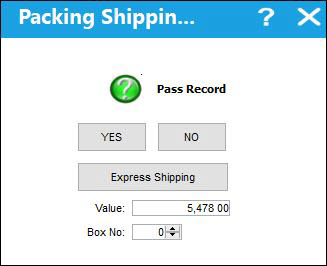
The Packing Shipping window will appear.
Enter the Value of the items on the picklist and select Yes. If the picklist does not require packing and shipping, select No.
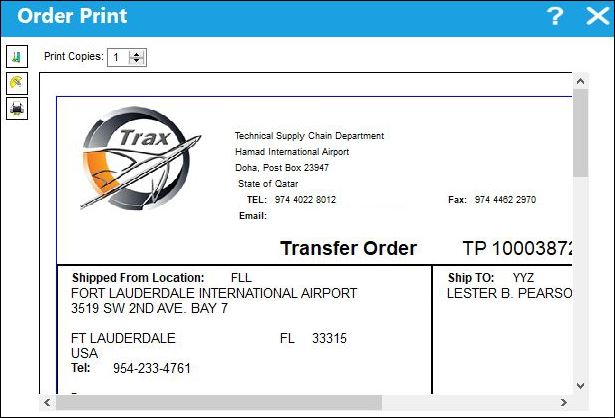
The Order Print window will open. The user can print the Order information from this window.
Share
Print
|
©1997-2026 Trax USA Corp. All rights reserved. This manual may not be copied, photocopied, reproduced, translated, or converted to any electronic or machine-readable form, in whole or in part, without prior written approval from Trax USA Corp. |
 |