
 Share
Share
 Print
Print
|
|
|
|
|


From the A/C Controller Panel window, select the Filter/Sort  button.
TRAX displays the A/C Controller Panel Filter/Sort window. Select the Defect tab.
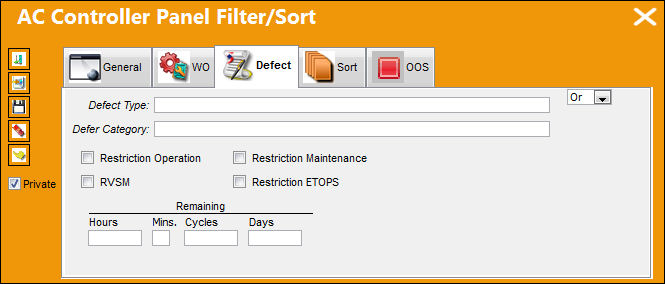
Enter/verify the following criteria that will establish the filter/sort profile:
_____________________________________________________________________________________
Defect Type
The type of defect found on the aircraft (for example, Pilot Report, MX Report). For additional information, refer to the Defect Type Transaction Code, via the Technical Records Transaction Code Manual.
Defer Category
Defer Category code.
Restriction Operation checkbox
Select this checkbox for MEL items with restriction operation.
Restriction Maintenance checkbox
Select this checkbox for MEL items with restriction maintenance.
RVSM checkbox
Select this checkbox for MEL items with Reduced Vertical Separation Minimum (RVSM).
Restriction ETOPS
Select this checkbox for MEL items with Restriction Extended Twin Engine Operation (ETOPS).
Remaining Hours
Defect Due within remaining hours.
Remaining Mins.
Defect Due within remaining minutes.
Remaining Cycles
Defect Due within remaining cycles.
Remaining Days
Defect Due within remaining days.
And/Or Logic
Select 'Or' to filter/sort by one field or more fields or another. Selecting 'Or' will allow the system to search for multiple individual criteria until it finds one. Select 'And' to filter/sort by two or more criteria. Selecting more than one criteria makes the search more specific.
_____________________________________________________________________________________
Select the Private  checkbox to view the private filter/sort profiles created.
Share
Print
|
©1997-2026 Trax USA Corp. All rights reserved. This manual may not be copied, photocopied, reproduced, translated, or converted to any electronic or machine-readable form, in whole or in part, without prior written approval from Trax USA Corp. |
 |