
 Share
Share
 Print
Print
|
|
|
|
|


From the A/C Controller Panel window, select the Filter/Sort  button.
TRAX displays the A/C Controller Panel Filter/Sort window, General tab.
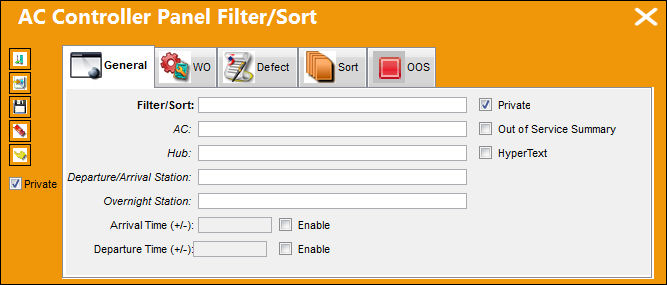
The following information/options are available in this window:
_____________________________________________________________________________________
Filter/Sort
User-created name of the Filter/Sort profile.
A/C
The individual aircraft tail number.
Hub
Hub code (used with Third Party Interface).
Departure/Arrival Station
Departure/Arrival Station code.
Overnight Station
Overnight station code.
Arrival Time (+/-)
Exact time A/C is due in (flight arrival time) within plus or minus number of minutes.
Departure Time (+/-)
Exact time A/C is due out (flight departure time) within plus or minus number of minutes.
Enable checkboxes
Select these checkboxes to enable the arrival and/or departure times, as necessary.
Company
This field only appears when G/L Interface Switch  COMPANYMULTI is set to 'Yes'. This feature is part of the Multi-Company functionality. Parent company's airlines are entered into this field. Then, when the P/N is entered into the detail window, the G/L field will be auto-populated with this airline's previously created G/L Account. For more information see the note in the G/L field of the Purchase Order Detail, General Tab and in the G/L Interface Switch COMPANYMULTI via the G/L Interface Switches Manual.
Private checkbox
Select this checkbox to create user only Filter/Sorts. This is not available to all users.
Out of Service Summary checkbox
Select this checkbox if this profile is to include the Out of Service Summary. For additional information, refer to the A/C In/Out Service Button via Defect Reports.
Hyper Text checkbox
Select this checkbox to activate hypertext so that scrolling over the record will display, in a pop-up window, additional record information.
 The hypertext information can be modified by specific customers. These customized modifications are not available for all customers.
_____________________________________________________________________________________
Select the New  button to begin a new filter/sort.
Select the Save  button to save the filter/sort profile.
Select the Delete  button to delete a filter/sort record.
Select the Select  button to select and apply the filter/sort.
Select the Private  checkbox to view the private filter/sort profiles created.
Share
Print
|
©1997-2026 Trax USA Corp. All rights reserved. This manual may not be copied, photocopied, reproduced, translated, or converted to any electronic or machine-readable form, in whole or in part, without prior written approval from Trax USA Corp. |
 |