
 Share
Share
 Print
Print
|
|
|
|
|


From the A/C Controller Panel window, select the Filter/Sort  button.
TRAX displays the A/C Controller Panel Filter/Sort window. Select the Sort tab.
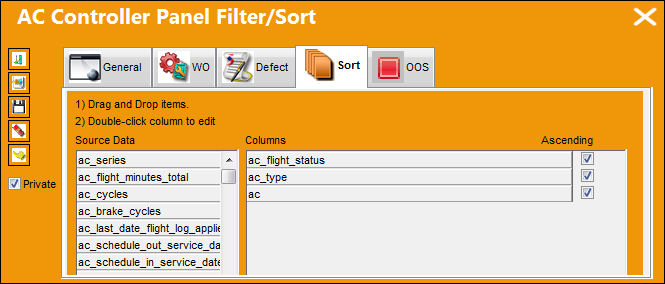
Enter/verify the following criteria that will establish the filter/sort profile:
_____________________________________________________________________________________
Ascending checkbox
Select the Ascending checkbox next to the field that needs to be listed in ascending order.
_____________________________________________________________________________________
Select the Private  checkbox to view the private filter/sort profiles created.
The above is the default sort for the A/C Controller Panel. The ac_flight_status, ac_type and ac cannot be removed, but the default sort may be modified. Use the scroll button for the Source Data section to see all fields that can be filtered or sorted.
Share
Print
|
©1997-2026 Trax USA Corp. All rights reserved. This manual may not be copied, photocopied, reproduced, translated, or converted to any electronic or machine-readable form, in whole or in part, without prior written approval from Trax USA Corp. |
 |