
 Share
Share
 Print
Print
|
|
|
|
|


From the A/C Controller Panel window, select the Filter/Sort  button.
TRAX displays the A/C Controller Panel Filter/Sort window. Select the OOS tab.
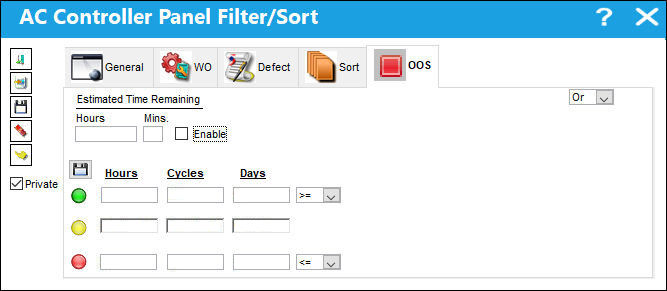
Enter/verify the following criteria that will establish the filter/sort profile for Out of Service aircraft:
_____________________________________________________________________________________
Estimated Time Remaining (Hours)
The estimated number of hours remaining for aircraft to be out of service.
Estimated Time Remaining (Mins)
The estimated number of minutes remaining for an aircraft to be out of service.
Enable checkbox
Select the Enable checkbox if the Estimated Time Remaining (Hours/Min) applies.
Private checkbox
Select this checkbox if this profile is to remain private.
And/Or Logic
Select 'Or' to filter/sort by one field or more fields or another. Selecting 'Or' will allow the system to search for multiple individual criteria until it finds one. Select 'And' to filter/sort by two or more criteria. Selecting more than one criteria makes the search more specific.
Hours/Cycles/Days 
Configurable triggers for traffic lights. The number of hours/cycles/days for an aircraft to be triggered into one of the following status':
- in service
- pending out of service
- out of service
The figures below are examples only and can be customized as per your companies business process.
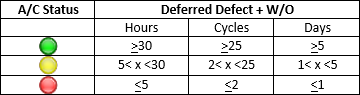
Note: This feature is customizable and may not be available for your company.
Logic Drop Down

Select one of the following logic functions to filter for data:
<= Less than or equal to.
<> Not equal to.
= Equal to.
>= Greater than or equal to.
Like Show data like or similar to.
Note: This feature is customizable and may not be available for your company.
_____________________________________________________________________________________
Select the New  button to begin a new filter/sort.
Select the Save  button to save the profile.
Select the Delete  button to delete a filter/sort record.
Select the Select  button to select and apply the filter/sort.
Select the Private  checkbox to view the private filter/sort profiles created.
Share
Print
|
©1997-2026 Trax USA Corp. All rights reserved. This manual may not be copied, photocopied, reproduced, translated, or converted to any electronic or machine-readable form, in whole or in part, without prior written approval from Trax USA Corp. |
 |