
 Share
Share
 Print
Print
|
|
|
|
|


Session Sign-On Method
Select the Session option to log in using the domain and password credentials. The Session Username and Session Domain fields must be set up via the Employee Master. In addition, the employee must also be set up in the Security Explorer. Once this initial set-up is complete, when the Session option is selected, the domain will auto populated in the Username field.
When selected, the Domain field becomes active.
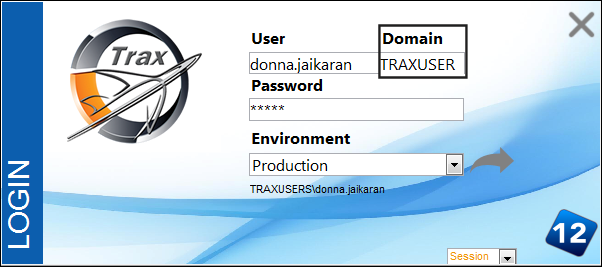
The Session Username and Session Domain fields must be set up via the Employee Master.
Go to Settings/Update/Employee Master
Select the Employee Master, Optional tab.
Populate the Session Username and Session Domain fields.
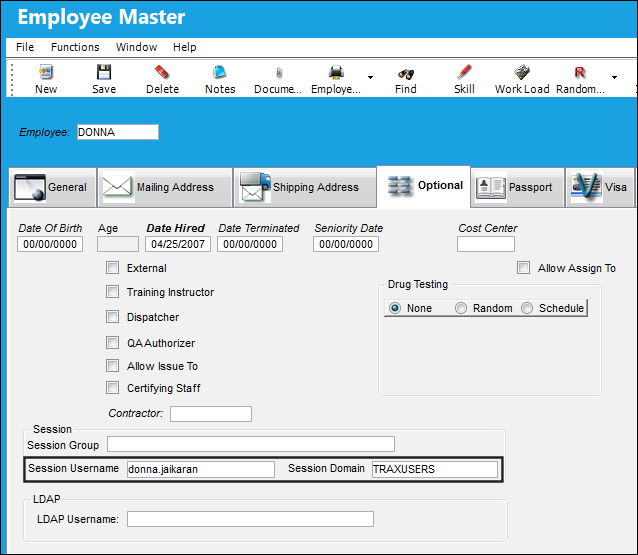
Select the Save  button to save all populated information.
For additional information, refer to the Employee Master, Optional Tab, via Employee Master which can be found in the Settings Training manual.
The Employee must be set up in the Security Explorer, Session tab.
Go to the Security Explorer, Session tab.
When the Employee name is selected, the Session Domain and Session Username is auto populated and grayed out.
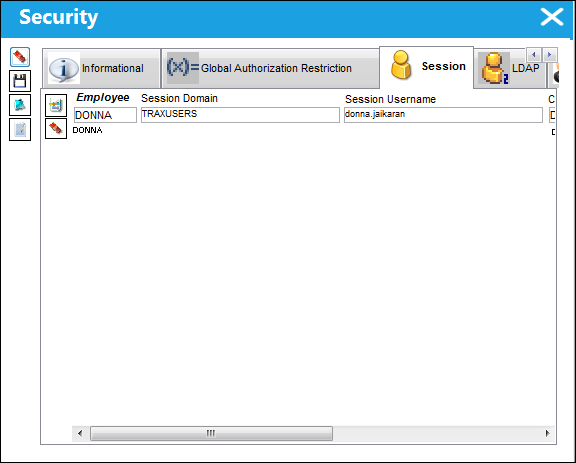
Select the Save button to save all populated information.
For additional information, refer to the Security Explorer, Session Tab via the Security Explorer which can be found in the System Administration Training manual.
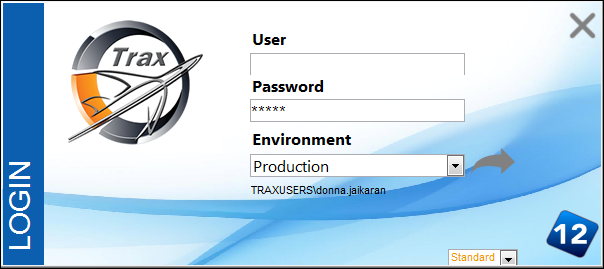
Now that the set up is complete, the user will be logged into TRAX by simply clicking on the Login button:
Share
Print
|
©1997-2026 Trax USA Corp. All rights reserved. This manual may not be copied, photocopied, reproduced, translated, or converted to any electronic or machine-readable form, in whole or in part, without prior written approval from Trax USA Corp. |
 |