
 Share
Share
 Print
Print
|
|
|
|
|


The Picklist tab can be found through the Work Order Detail window when one or more Picklists are associated to a Work Order.
 This tab is security controlled via Security Explorer/ Production/ Update/ W/O/ W/O Picklist Tab. For more information, refer to the via Security Explorer in the System Administration Training Manual.
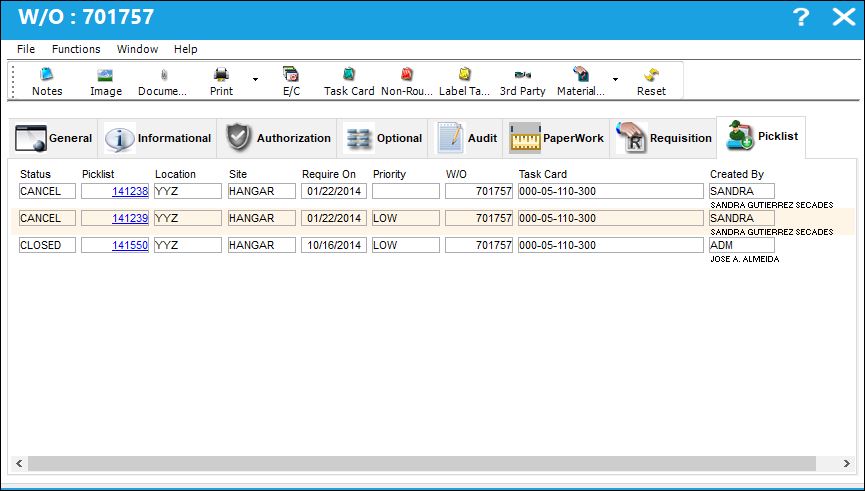
The information provided for each Picklist is as follows:
_____________________________________________________________________________________
Status
The status of the Picklist.
Picklist
List of reserved components for a maintenance event or for transfer.
Location
The Location for maintenance events, inventory stores, orders, transactions, or training events.
Site
The site the part/picklist is going to.
Require On
The date that the item(s) is/are required by.
Priority
The level of importance placed on the need for a part. Notification based on the requisition priority may be defined by location. These codes are defined in the Priority System Transaction Code.
W/O
The Work Order used to categorize, manage, and schedule work requirements for aircraft maintenance.
Task Card
The Task Card / Job Card that details the scheduled maintenance work.
Created By
The user who created the record.
_____________________________________________________________________________________
From this window users can select the Update Picklist Priority  button which will match the Picklist Priority with the Priority of the Work Order it is attached to. For more information refer to the Update Picklist Priority Button.
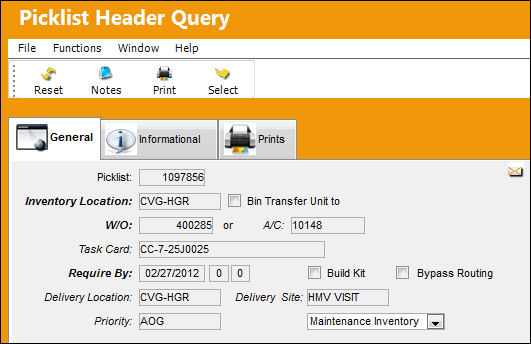
Users can also access the Picklist Header Query window by selecting into the Picklist itself.
Share
Print
|
©1997-2026 Trax USA Corp. All rights reserved. This manual may not be copied, photocopied, reproduced, translated, or converted to any electronic or machine-readable form, in whole or in part, without prior written approval from Trax USA Corp. |
 |