
 Share
Share
 Print
Print
|
|
|
|
|


Picklists are used to issue parts from inventory that are needed to perform certain work. They are always associated with a work order (or task card) and an aircraft. Picklists are issued at the location where the maintenance is planned, but can be transferred to a different location if the entire planned maintenance for that work order is transferred. If the parts that are on a picklist are not available at the inventory store location, a requisition will be issued. The system can automatically create a Picklist when parts are reserved for a work order. For example, line maintenance on an aircraft requires that specific parts be available (on hand) to perform the line maintenance routine. To get a part issued from the inventory system, it must be processed with one of the issue transactions. There are three types of issues (Manual Issue, Picklist Issue, and Express Issue):
_____________________________________________________________________________________
Manual Issue
The Manual Issue program is used to issue parts from the system 'Over the Counter' from a store's location.
Picklist Issue
The Picklist Issue (Picklist Creation) will issue the parts to a Picklist, which will be added to a Work Order.
Express Issue
The Express Issue option was designed specifically for using a bar code system for the issue of parts.
_____________________________________________________________________________________
The Picklist is printed in the stock room (where parts are stored), the parts are collected, and are all issued in one transaction.
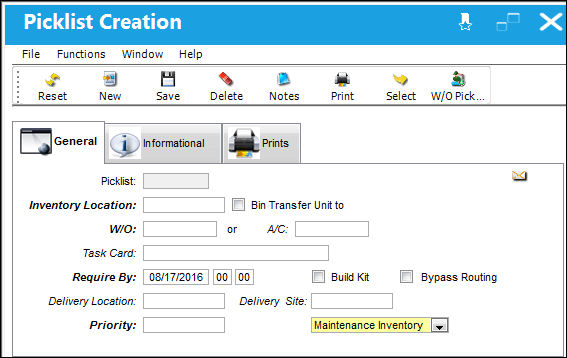
The Picklist Creation program is used to create a list of parts required for the work to be performed. From the Picklist Issue Selection window, select the Picklist Creation  button to create a new Picklist.
TRAX displays the Picklist Creation window:
For additional information regarding the Picklist Button, refer to Picklist Creation, via the Inventory Training Manual.
See Picklist Button, via W/O Task Card for additional information regarding Closed W/O with Picklists that remain unissued.
Share
Print
|
©1997-2026 Trax USA Corp. All rights reserved. This manual may not be copied, photocopied, reproduced, translated, or converted to any electronic or machine-readable form, in whole or in part, without prior written approval from Trax USA Corp. |
 |