
 Share
Share
 Print
Print
|
|
|
|
|


Filter/Sort Option/Button

The Filter/sort option allows the user to filter and sort through countless records. The Filter/sort option is designed to aid the user in matching the actual search results with the user's needs.
This Filter/Sort option is available throughout the entire TRAX application and also functions in the form of the Filter/Sort  button.
Select the Filter/Sort checkbox, drop down menu  buttons appear for every column in the results section.
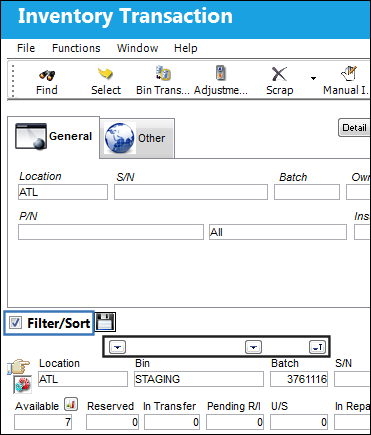
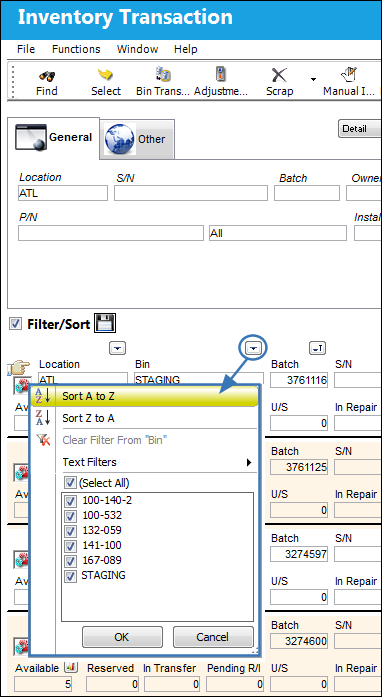
Select the drop down menu button for a specific column, several Filter/sort options become available. Select the desired options and click 'OK.'
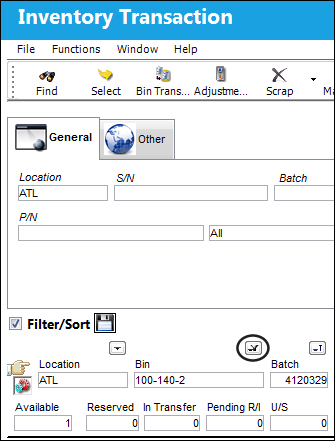
The window automatically refreshes, displaying the filter/sort options selected. The drop down menu button changes to show the user that the filter has taken effect.
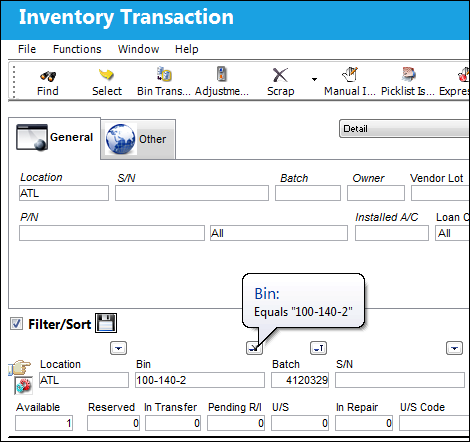
If the user hovers over the drop down menu button, the hypertext will display the filter selections.
Share
Print
|
©1997-2026 Trax USA Corp. All rights reserved. This manual may not be copied, photocopied, reproduced, translated, or converted to any electronic or machine-readable form, in whole or in part, without prior written approval from Trax USA Corp. |
 |