
 Share
Share
 Print
Print
|
|
|
|
|


Employee Master, R/O Capability Rating Tab

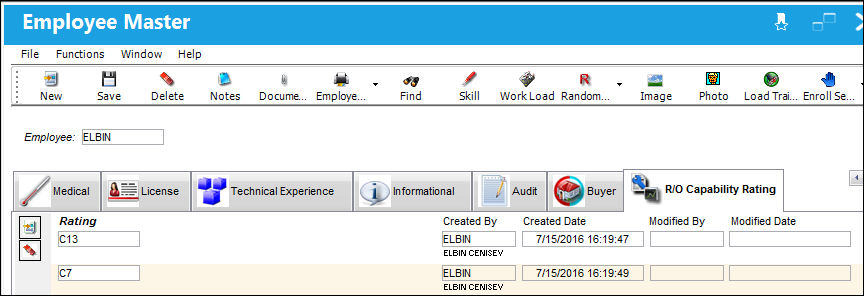
The R/O Capability tab is used to assign R/O Capability Ratings to specific Employees. These Ratings are linked to Authority organizations (e.g., FAA, EASA) via the R/O Capability window of the P/N Master.
These Ratings become vital when when a Shop employee is printing a Form 1 print for a Shop W/O. If the part repaired via this W/O contains R/O Capability Ratings, only those employees with the required Ratings will be allowed to print the Form 1. This functionality works in conjunction with Shop Switch  SHOPEMPRORATING. For more information refer to the Shop Switches Manual
.
 This tab is security-controlled via Settings/ Update/ Employee R/O Capability Rating. For more information refer to the Security Explorer via the System Administration Training Manual.
Select the New  button to add a new Rating for the Employee. Multiple Ratings can be applied to each Employee.
Select a RO Capability Rating Code from the previously created transaction code (via Settings/ Explorer/ System Transaction Code/ Settings/ RO Capability Rating).
To delete an entry, select the Delete  button.
 R/O Capability Employee Rating Process
Share
Print
|
©1997-2026 Trax USA Corp. All rights reserved. This manual may not be copied, photocopied, reproduced, translated, or converted to any electronic or machine-readable form, in whole or in part, without prior written approval from Trax USA Corp. |
 |