
 Share
 Print
|
|
|
|
|


Select the Compliance  button to view the Shop Task Card compliance records.
When a Shop Task Card is used on a Shop Work Order, a record will be created and kept on this window.
The record will contain the Shop Work Order number, the E/C, and the Aircraft/Part that the Shop Task Card was used on (if applicable for E/C or P/N).
The information will only appear on this window once the Work Order is closed because compliance records are written upon Work Order closing.
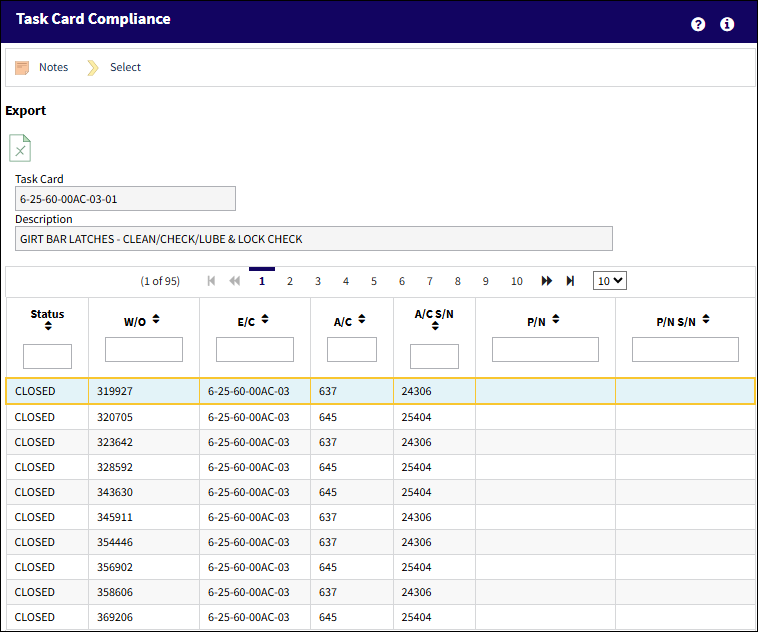
The following information/options are available in this window:
_____________________________________________________________________________________
Status
The current status of the Task Card. The status of the Task Card is helpful in determining the stage the Task Card is at with regard to it's completion. Ultimately, the completion of the Task Cards will result in the closing of the Work Order.
Task Card
The Task Card / Job Card that details the scheduled maintenance work.
W/O
The Work Order used to categorize, manage, and schedule work requirements for aircraft maintenance. This it the Work Order number on which the Task Card was completed.
E/C
The Engineering Control that specifies aircraft or component scheduled maintenance intervals. The E/C reference the Task Card was associated to (if applicable).
A/C
The individual aircraft tail number.
A/C S/N
The Aircraft's Serial Number which is provided by the manufacturer. This serial number is like a registration number, but it is not dependent on a country code and therefore never changes.
P/N
The Part Number reference for the aircraft part. This is the Part Number used in association to the T/C of the Work Order.
P/N S/N
The Serial Number for the specific serialized part. This is the Part Number Serial Number the Task Card was used for on the Work Order.
_____________________________________________________________________________________
Additional information relevant to the record can be included through the Notes  button.
Share
Print
|
©1997-2026 Trax USA Corp. All rights reserved. This manual may not be copied, photocopied, reproduced, translated, or converted to any electronic or machine-readable form, in whole or in part, without prior written approval from Trax USA Corp. |
 |