
 Share
 Print
|
|
|
|
|



The ENG Request  button allows users to raise Engineering Requests within the Task Card/Engineering Control windows. Selecting the button will display the W/O Task Card/Defect Engineering Request pop up window. Enter the desired information in the appropriate fields and save the record to implement it into the system. For more information regarding Engineering Requests, refer to Engineering Requests Review.
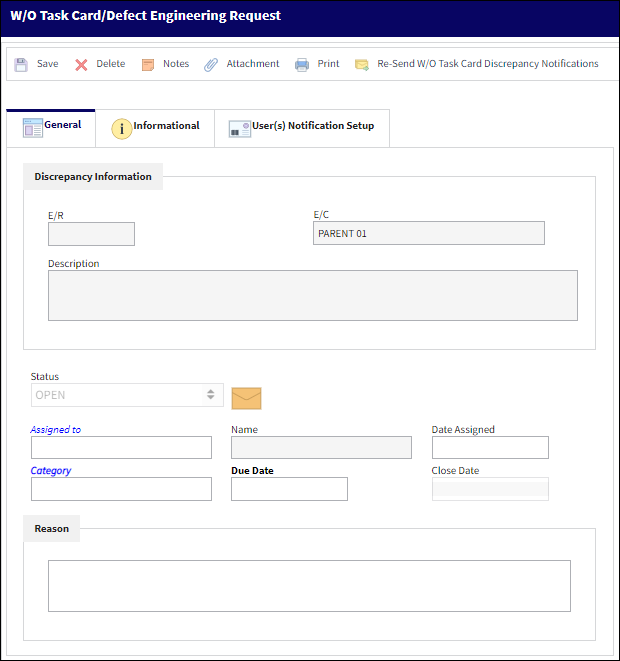
The following information/options are available in this window:
_____________________________________________________________________________________
Re-Send W/O Task Card Discrepancy Notifications  button
Select this button to re-send notifications regarding the engineering request. The notification will be sent to the user(s) that have been setup via the User(s) Notification Setup Tab. For more information, refer to User(s) Notification Setup Tab.
E/R
Auto-generated number assigned sequentially to each Engineering Request.
E/C
The Engineering Control that specifies aircraft or component scheduled maintenance intervals.
Description
The Task Card or Defect Report description the Engineeing Request was created for.
Status
The status of the Engineering Request discrepancy (Open, Under Review, Reviewed, Rejected, Closed).
Assigned to
The person that the discrepancy is assigned to.
Name
The name of the assigned employee.
Date Assigned
The date when the discrepancy was assigned to the user.
Category
The discrepancy category as entered by the reporting user.
Due Date
The date/time the Engineering Request needs to be actioned by.
Close Date
The date when the discrepancy is closed. This field is only available when the discrepancy is in 'Reviewed' Status.
Reason
The reason as to why the discrepancy is being reported.
_____________________________________________________________________________________
 Engineering Request Review Process
Share
Print
|
©1997-2026 Trax USA Corp. All rights reserved. This manual may not be copied, photocopied, reproduced, translated, or converted to any electronic or machine-readable form, in whole or in part, without prior written approval from Trax USA Corp. |
 |