
 Share
 Print
|
|
|
|
|


The Forms  button is used to respond to questions that are relevant to the Shop Task Card.
To respond to a form, select the New  button. Then from the Form Responses window that opens up, select the Form Type then the specific Form to respond to. The selected form will be displayed.
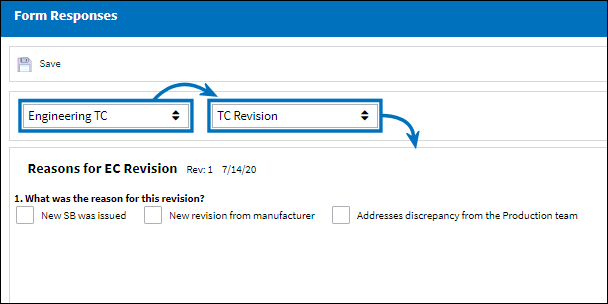
Once the answers are entered, select the Save  button. For more information refer to How to Answer a Form created in the Forms Master.
Note: Forms are created from the Forms Master and are linked to different modules and Form Types. For more information on creation forms refer to the Forms Master window.
Share
Print
|
©1997-2026 Trax USA Corp. All rights reserved. This manual may not be copied, photocopied, reproduced, translated, or converted to any electronic or machine-readable form, in whole or in part, without prior written approval from Trax USA Corp. |
 |