
 Share
Share
 Print
Print
|
|
|
|
|


Surplus Sales - Configuring P/Ns for Sale

Prior to selling surplus parts on the World Part Locator, parts that will be sold should be set up with default Unit Sell prices for each Condition prior to adding the part/conditions to the P/N Catalog.
The following process is an overview of the steps to take.
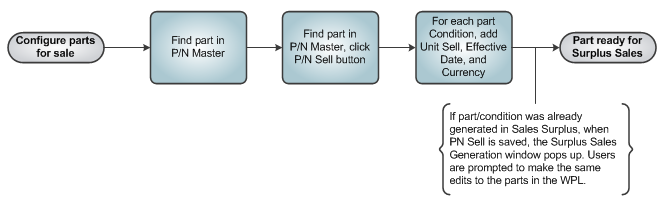
From the P/N Master, select the Sell button for the desired part. Unit Sell configurations can be set up for each Condition that will be made available for sale. Each Condition will have a Unit Sell, a main Currency, and an Effective Date for the record.
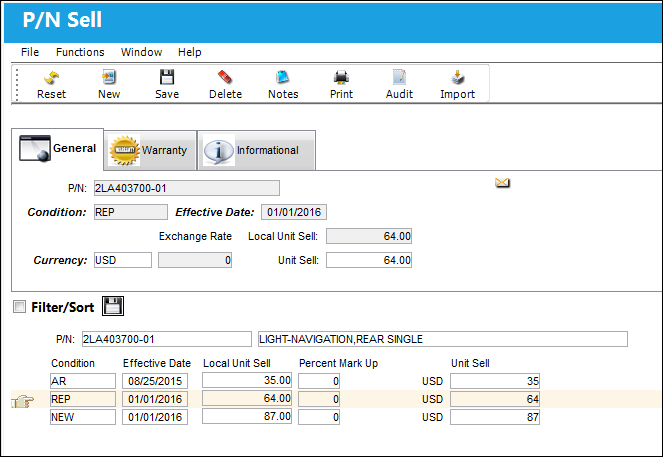
The following information/options are available in this window:
_____________________________________________________________________________________
P/N
The Part Number reference for the aircraft part. This is the part that will be available for purchase in the World Part Locator.
Condition
The condition of the part being sold.
Effective Date
The date that the Unit Sell record for the Condition is in effect.
Currency
The currency for the part being sold.
Exchange Rate
The chosen currency's exchange rate compared to the user's main currency. The Exchange Rate for each currency is set up via the Currency Transaction Code. For additional information, refer to the Currency Transaction Code, via the G/L Interface Transaction Code Manual. This value changes depending on the currency selected.
Unit Sell
The Sell Price of the part for the defined Condition. This price is not necessarily the same as the cost of the part to the company. A part can have a different Unit Sell price for each different Condition. This price will default into various Customer Orders.
_____________________________________________________________________________________
For more details on the functionality of this button, refer to the Sell Button, via the P/N Master.
After a part/condition record is added to the P/N Catalog in the Surplus Sales window, whenever an edit is made to the part/condition record in P/N Sell window the Surplus Sales Generation pop-up window will appear with the edits made to the part/condition record. This pop-up window prompts users to update the WPL P/N Catalog record as soon as the P/N Sell information for the part/condition is updated. This pop-up will only come up for parts listed in the WPL's P/N Catalog. For more information refer to the Surplus Sales Generation, via the Sell Button in the Settings module.
Share
Print
|
©1997-2026 Trax USA Corp. All rights reserved. This manual may not be copied, photocopied, reproduced, translated, or converted to any electronic or machine-readable form, in whole or in part, without prior written approval from Trax USA Corp. |
 |