
 Share
Share
 Print
Print
|
|
|
|
|


Surplus Sales

Through TRAX's World Part Locator, TRAX operators can sell their surplus inventory to other TRAX operators through an in-TRAX global marketplace.
The WPL marketplace is a business-to-business interfacing system that is built directly into the TRAX application for efficient, reliable access. This marketplace allows current TRAX operators to convert no longer in-use inventory into a potential revenue stream, at no additional cost to the operator.
P/N Catalogs are created and provided to fellow TRAX operators through the Surplus Sales window in Customer Orders. Once uploaded to the WPL cloud, other TRAX operators can view these P/N Catalogs through the World Part Locator (via their Inventory module). As customer order parts, Sales Orders are created automatically via the WPL interface.
The following is a general overview of the WPL's Surplus Sales process.
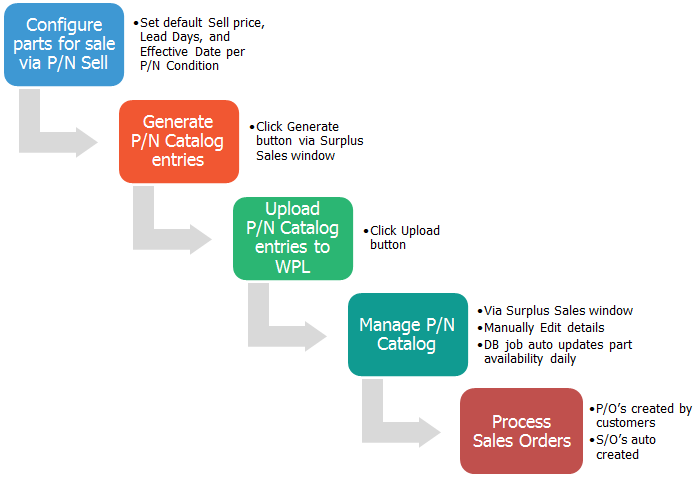
Refer to these links for information on each step of the process:
- Configuring P/Ns for Sale
- Generating and Uploading WPL P/N Catalogs
- Managing WPL P/N Catalogs
- Processing WPL Sales Orders
- Completing WPL Sales Orders
Before being able to use the Surplus Sales functionality, certain World Part Locator configurations need to be set. Refer to the following topics for more information: World Part Locator Configuration Button and WPL Customer Master Configuration.
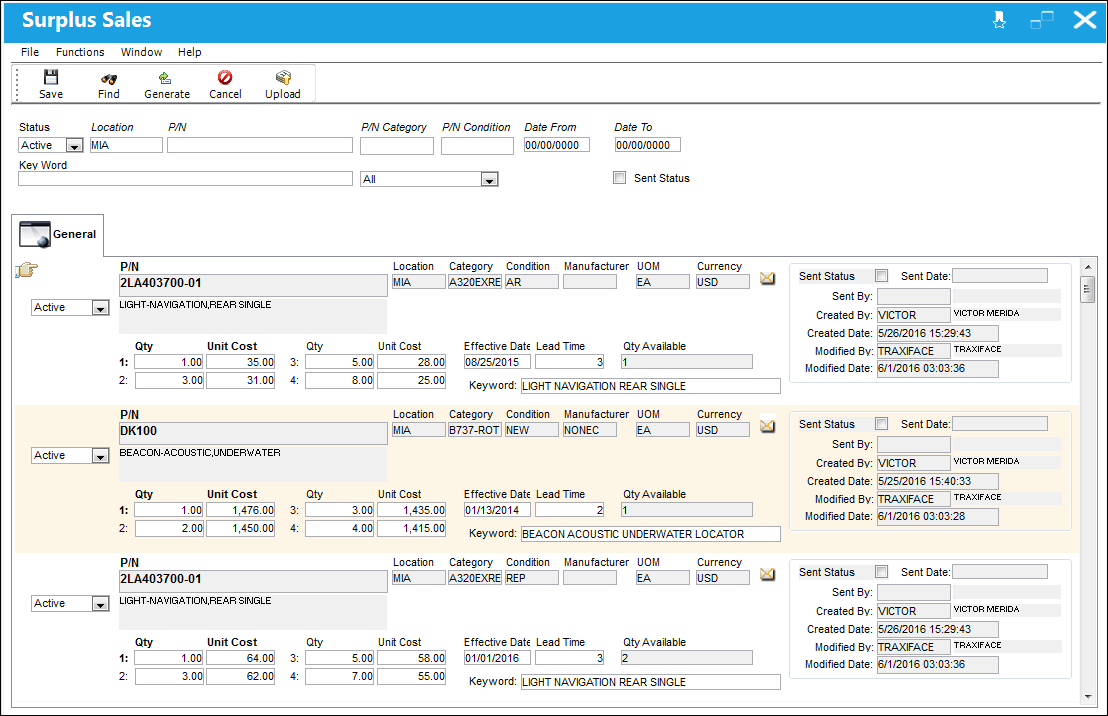
The Surplus Sales window is the hub for selling parts on the World Part Locator. This window allows users to generate, manage, and upload their company's P/N Catalogs to the World Part Locator cloud. Refer to the above links for best practices on how to use this window: Generating and Uploading WPL P/N Catalogs and Managing WPL P/N Catalogs.
The World Part Locator system is also available for TRAX operators to buy parts from other TRAX operators and from third party vendors through the WPL marketplace. For detailed information on this aspect of the WPL, refer to the World Part Locator via the Inventory module.
Share
Print
|
©1997-2026 Trax USA Corp. All rights reserved. This manual may not be copied, photocopied, reproduced, translated, or converted to any electronic or machine-readable form, in whole or in part, without prior written approval from Trax USA Corp. |
 |