
 Share
Share
 Print
Print
|
|
|
|
|


Exchange Order Out Finalization
The Exchange Order Out Finalization window is used to create an invoice that is sent to a customer for an Exchange Order Out. Before creating the invoice, the X/O's information can be reviewed.
To invoice the order, search for the X/O in the Exchange Order Out Finalization window.
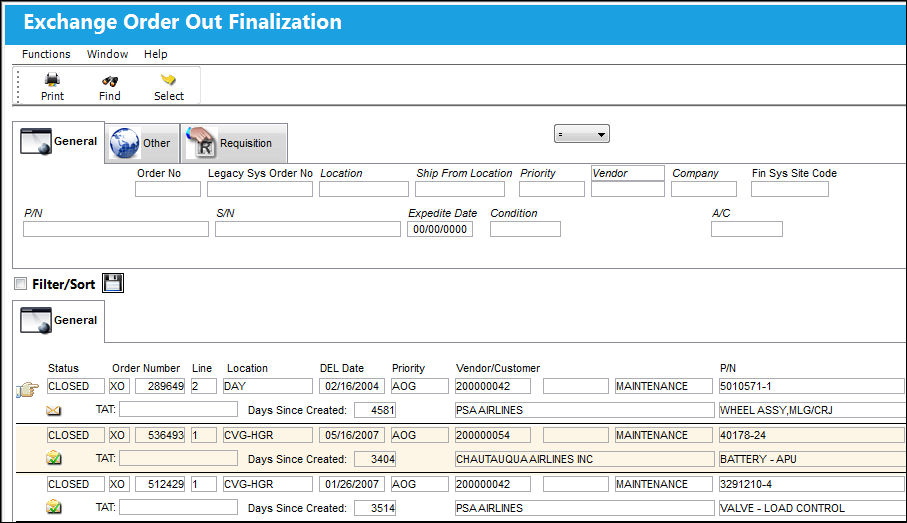
For information on each of the available search fields, refer to Exchange Order Out Finalization Search.
Then select into the record to access the X/O in query mode. For more information on the fields in the X/O windows refer to the Exchange Order Out window.
From the X/O Detail window, users can edit some of the X/O Detail's information (i.e., Exchange Costs, Delivery Date, UOM, Repair code, and A/C). Users must then select the Invoice checkbox and save the window to create the invoice.
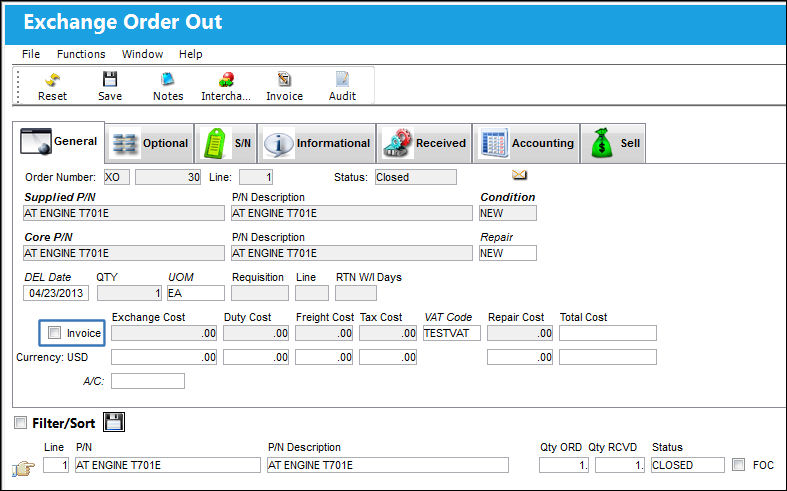
When switch  XOINVAUTH is set to Yes, the invoice must be approved in the Customer Invoice Authorization window before being sent to the customer. When set to No, the invoice created from the Exchange Order Out Finalization window can be sent directly to the customer.
When switch XOBOOKTOMAN is set to Yes, users can link the X/O to a Work Order and Task Card through the Book To option in the Exchange Order Out Detail, Optional tab when accessed via the Exchange Order Out Finalization window. When set to No, the Book To option in the Exchange Order Out Detail, Optional tab is not available through the Exchange Order Out Finalization window.
 Share
Print
Share
Print
|
©1997-2026 Trax USA Corp. All rights reserved. This manual may not be copied, photocopied, reproduced, translated, or converted to any electronic or machine-readable form, in whole or in part, without prior written approval from Trax USA Corp. |
 |