 Download Online Help
 Print
|
|
|
|
|


Select the Labor  button to apply labor sell rates for specific Skills linked to the contract. These available configurations include each skill's hourly, overtime, and double time rates. These rates serve as a baseline for labor fees that may then be subject to additional flat rate rules for Task Cards and their Non-Routines (via the Flat Rate Task Card option).
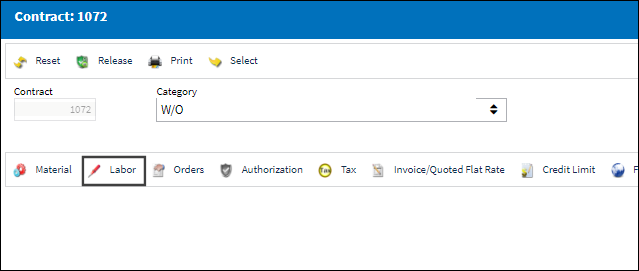
The Skill Selection window appears.
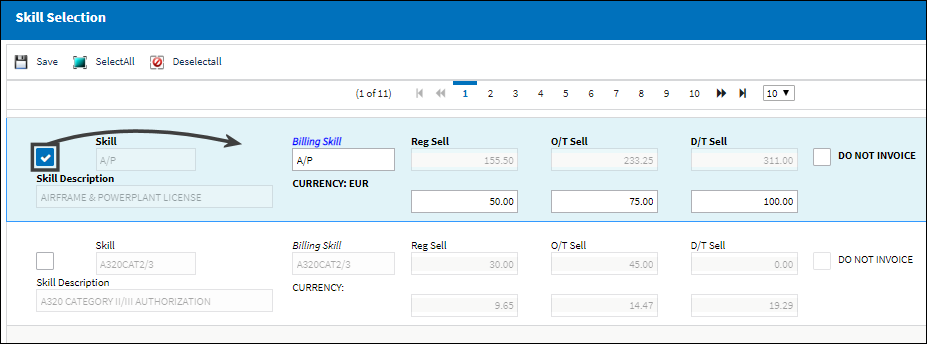
- Select a Skill.
- Enter the Billing Skill (this is the code that the customer will see in the invoice for the type of labor).
- Enter the hourly cost for the Skill in the Reg Sell field, the hourly cost for overtime work in the O/T Sell field, and the hourly cost for double-time work in the D/T Sell field.
- If the customer will not be paying the labor costs for this skill, then select the Do Not Invoice checkbox. The costs will be listed in invoice as information but the customer will not be expected to pay.
- Repeat steps 1-6 for each applicable Skill. (Skills that are not selected will not follow any rules set up through this contract.)
Note: Each Skill must be configured one at a time.
The following options/information is available in this window:
_________________________________________________________________________
Skill
The Skill required by employees to perform the task.
Skill Description
The long description for the Skill as defined in the Skill Master.
Billing Skill
The Billing Skill classification for customer contracts does not necessarily exist in the Skill Master but will appear on the Customer Work Order Invoice for the Skill applied to the Work Order (i.e. the Skill in the system may be technician; however, the Billing Skill classification may appear as mechanic if defined here).
Note: This field is based on a trans code listing with multiple billing skills to choose from. The transaction code is found via Settings/Explorer/System Transaction Codes/Production/Billing Skill.
Reg Sell
The local currency the material or labor (regular hourly rate) are being sold at regardless of the Sell Method being used. (i.e. standard, surcharge or flat rate).
O/T Sell
The Overtime rate per hour.
D/T Sell
The Double Time rate per hour.
Do Not Invoice checkbox
When selected, the material or labor specified will be displayed in the invoice, but the customer will not be charged for the material or labor specified. For example, this could include materials such as gloves, or labor such as washing or towing of an aircraft that should be listed in the invoice but the customer may not be required to pay for.
Refer to Do Not Invoice Checkbox for more details and an example.
_________________________________________________________________________
Download Online Help
Print
|
©1997-2018 Trax USA Corp. All rights reserved. This manual may not be copied, photocopied, reproduced, translated, or converted to any electronic or machine-readable form, in whole or in part, without prior written approval from Trax USA Corp. |
 |