 Download Online Help
 Print
|
|
|
|
|


The Invoice/Quoted Flat Rate  button allows users to establish payment terms for the contracted work. From this window, a flat rate will be established for the contracted work in the Sell Amount, then a breakdown of the payments that will need to be made throughout the life of the contract will be specified in the Due List button.
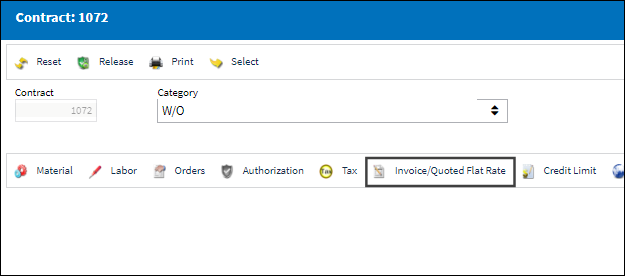
The Invoice/Quoted Flat Rate window appears.
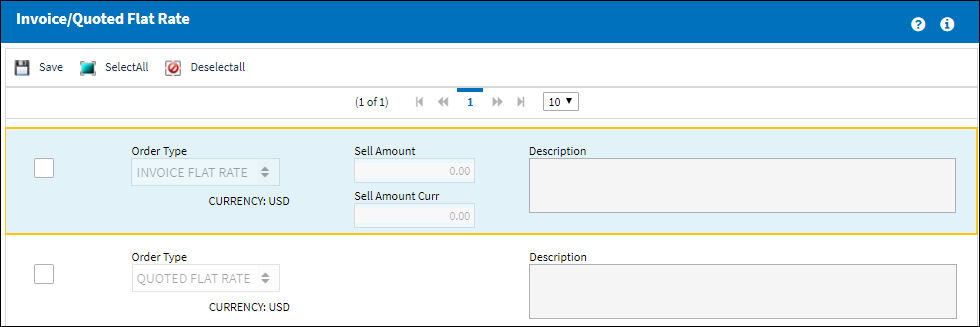
The following options/information is available in this window:
_________________________________________________________________________
Order Type
The type of Flat Rate to apply to the contract. The options are Invoice Flat Rate or Quoted Flat Rate.
Due List  button
The Invoice Flat Rate allows a flat rate fee to be invoiced and paid in increments based on percentage breakdowns of the total fee. This functionality allows flat amounts to be paid before, during and after the Third Party work is performed. Select the Due List button to add information such as Percentage Due and Terms. For more information refer to the Invoice Flat Rate via the Production Training Manual.
Note: This button is only available for the Invoice Flat Rate option.
Sell Amount
The local currency that the material or labor (regular hourly rate) are being sold at regardless of the Sell Method being used (i.e. standard, surcharge or flat rate).
Description
A description of the Flat Rate being added to the contract.
Currency
The exchange rate currency is displayed. When an amount is entered in the Currency field, the exchange rate between the main Currency and the secondary Currency is applied to the Sell Amount. For more information on the Currency selections, refer to Switches  CURRENCY and CURRENC2 via the G/L Interface Switches Manual. The Currency exchange rate is applied for each Currency in the System Transaction Code/ G/L Interface/ Currency.
_________________________________________________________________________
Download Online Help
Print
|
©1997-2018 Trax USA Corp. All rights reserved. This manual may not be copied, photocopied, reproduced, translated, or converted to any electronic or machine-readable form, in whole or in part, without prior written approval from Trax USA Corp. |
 |