 Download Online Help
 Print
|
|
|
|
|


Select the Order  button to add order markup percentages for any Repair Orders, Exchange Orders, Loan Order, and/or Service Orders that may be necessary as part of the third party work being performed. (For instance, if a part must be repaired in order to complete the work, a Repair Order would be created to capture the repair and its costs. As such, a markup percentage may be applied through the contract in consideration for the Repair Order performed for the customer.)
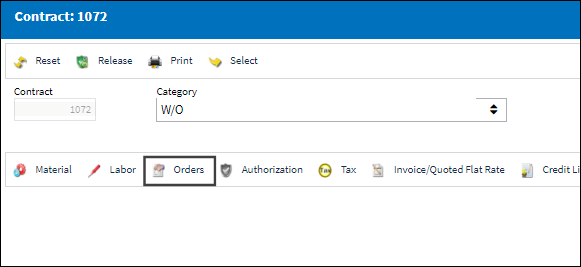
The Order Mark Up Selection window opens as follows.
- Select an Order Type.
- Enter the markup percentage. This percentage will be applied to the cost of the order.
- Repeat for each applicable order type. (Order types that are not selected will not follow any markup rules set up through this contract.)
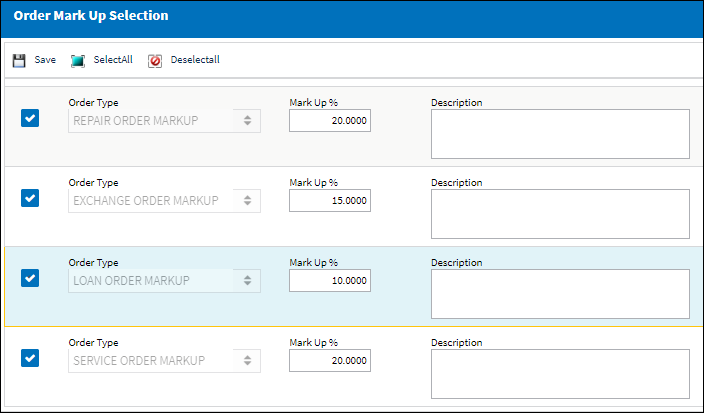
The following options/information is available in this window:
_________________________________________________________________________
Order Type
The type of order affected by the Mark Up. Each order type can have it's own unique markup rate. The options are:
- Repair Order Markup
- Exchange Order Markup
- Loan Order Markup
- Service Order Markup
Mark Up %
The percentage that the repair, exchange, loan, or service order has been marked up. This percentage will be applied to the cost of the order in the customer's invoice.
Example: An order is required to complete the third party work. If the order's total cost is $500.00, and a 15% markup is applied here for that order type, the customer will be charged $575.00 for the order.
Description
A description of the Mark Up.
_________________________________________________________________________
For information on how to link an Order to a Third Party Work Order, refer to the Customer Invoice Authorization Charges section of the Production Training Manual.
Download Online Help
Print
|
©1997-2018 Trax USA Corp. All rights reserved. This manual may not be copied, photocopied, reproduced, translated, or converted to any electronic or machine-readable form, in whole or in part, without prior written approval from Trax USA Corp. |
 |