 Download Online Help
 Print
|
|
|
|
|


The Flat/Surcharge Rate Other  button is used to add flat rates and/or surcharges to labor hours and/or materials to the contract. Flat rates would override the Material and Labor costs set up in the Material and Labor buttons, while surcharges would be added to the costs. Additionally, this option allows users to add addbills to the contract for work that falls outside of the scope of the Task Cards and Non-Routines (e.g., addbills for towing, fueling, cleaning, etc.).
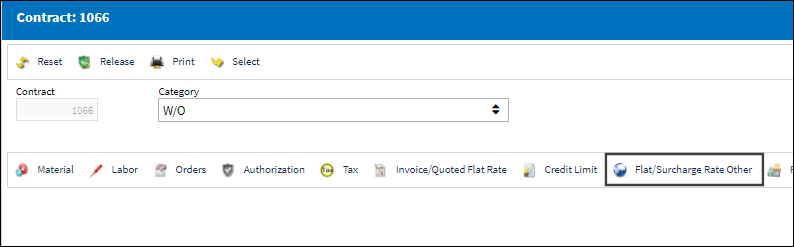
Choose from the options in the Category dropdown then enter the Sell Amount and any other applicable flat rate or surcharge figures. One or more of the available Categories can be applied to the contract but clicking the New  button.
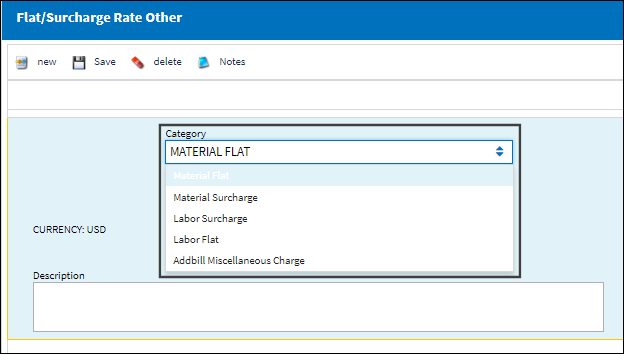
Each option is detailed in the following sections:
- Material Flat
- Material Surcharge
- Labor Surcharge
- Labor Flat
- Addbill Miscellaneous Charge
Material Flat
Choose 'Material Flat' to charge a flat rate for all materials used through the contract. The flat rate is entered in the Sell Amount Curr field.
The flat rate will cover all material costs up until a maximum cost threshold is reached. Once that max threshold is surpassed, all material costs accrued after the max cost will be charged to the customer. The optional max amount threshold is entered in the Max Material Cost Curr field.
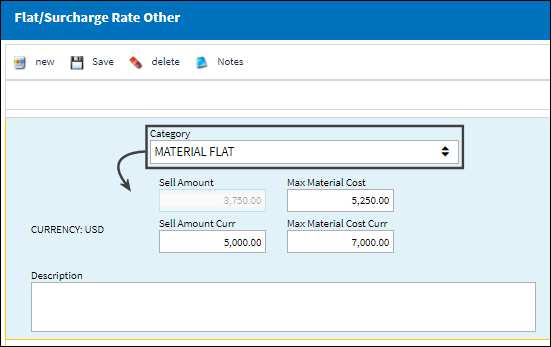
Note: The Currency field is indicating the customer's currency for the Contract (as input in the Customer Contract, General tab).
The Sell Amount Curr and Max Material Cost Curr fields in the bottom represent the customer's currency. Values are entered in the customer's currency.
The Sell Amount and Max Material Cost fields in the top represent the vendor's currency (which is based on the Company entered in the Customer Contract, General tab). These vendor currency fields at the top are auto-populated based on the values inserted in the customer currency fields at the bottom.
Material Surcharge
Choose 'Material Surcharge' to apply a surcharge fee that is additional to the costs of materials accrued to complete the work. This surcharge is entered in the Sell Amount Curr field.
The material fees, separate from the surcharge fee, will be accrued based on the configurations made through the Material button.
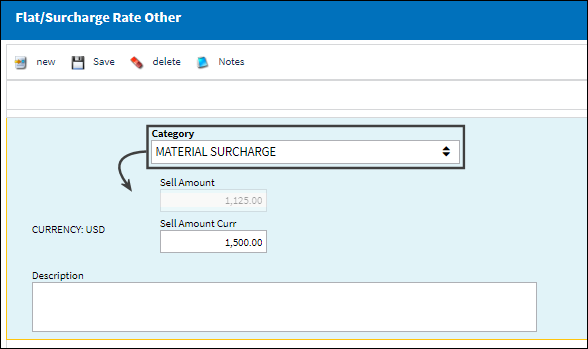
Note: The Currency field is indicating the customer's currency for the Contract (as input in the Customer Contract, General tab).
The Sell Amount Curr field in the bottom represents the customer's currency. Values are entered in the customer's currency.
The Sell Amount field in the top represent the vendor's currency (which is based on the Company entered in the Customer Contract, General tab). These vendor currency fields at the top are auto-populated based on the values inserted in the customer currency fields at the bottom.
Labor Surcharge
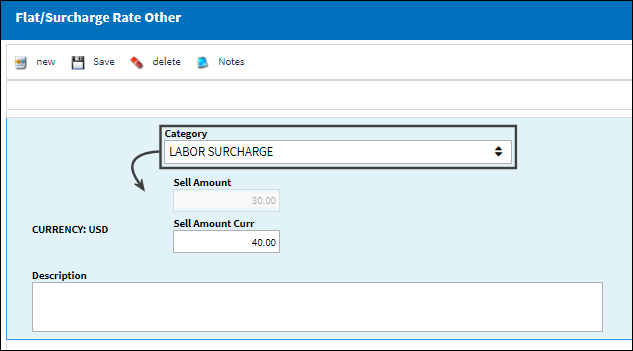
Choose 'Labor Surcharge' to apply an hourly surcharge fee that is additional to the costs of labor fees accrued to complete the work. This surcharge is entered in the Sell Amount Curr field.
The labor fees, separate from the surcharge fee, will be accrued based on the configurations made through the Labor button.
Labor Flat
Choose 'Labor Flat' to charge a flat rate for each labor hour accrued through the contract. The hourly flat rate is entered in the Sell Amount Curr field.
The hourly flat rate will determine the cost of each labor hour up until a maximum hours threshold is reached. Once that max hours threshold is surpassed, the HRS Rate will be charged for each hour over the Max Hours threshold.
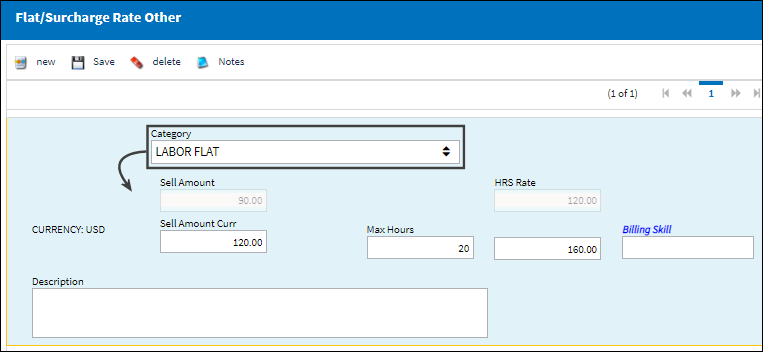
For example, the hourly flat Sell Amount is $120 and 25 labor hours are accrued.
If there is no Max Hours threshold, the cost for 25 hours will be $3,000. (based solely on the hourly Sell Amount)
But if there is a Max Hours threshold of 20 hours, the 5 hours past that threshold will be billed at the HRS Rate of $160 per hour. The labor cost in this case would be $2,400 for the first 20 hours ($120 x 20 = $2,400), plus $800 for the 5 hours above that Max Hours threshold ($160 x 5 = $800). The total cost for the 25 hours will then be #3,200. (based on the hourly Sell Amount for the hours under the Max Hours threshold and HRS Rate for the hours over the Max Hours threshold)
Addbill Miscellaneous Charge
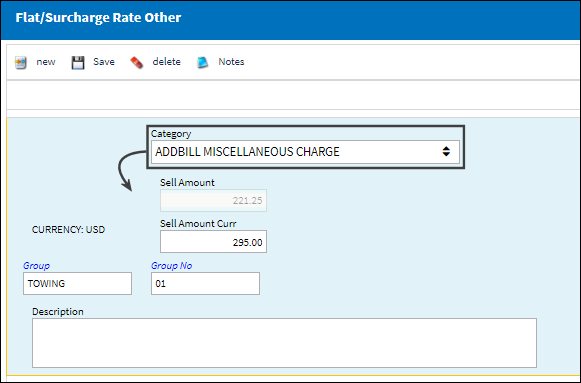
Choose 'Addbill Miscellaneous Charge' to add addbills to the contract for work that falls outside of the scope of the Task Cards and Non-Routines (e.g., aircraft towing, fueling, cleaning, etc.).
Specify addbill's Group and Group Number then the cost of the service in the Sell Amount Curr field. The Addbill groups and group numbers are mapped from the Customer Addbill Master. From that window, unique addbill details can be created for specific customers.
Download Online Help
Print
|
©1997-2018 Trax USA Corp. All rights reserved. This manual may not be copied, photocopied, reproduced, translated, or converted to any electronic or machine-readable form, in whole or in part, without prior written approval from Trax USA Corp. |
 |