
 Share
Share
 Print
Print
|
|
|
|
|



The NRTC (Non-Routine Task Card) Tab allows the user to view all Non-Routine Task Cards related to the Work Orders in the Display By Area.
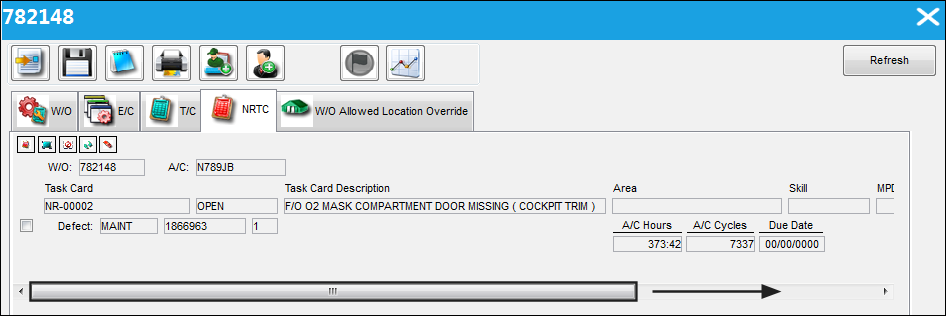
The following information/options are available in this window:
_____________________________________________________________________________________
W/O
The Work Order used to categorize, manage, and schedule work requirements for aircraft maintenance.
A/C
The individual aircraft tail number.
Task Card
The Task Card / Job Card that details the scheduled maintenance work.
Area
The area in which this Task Card is relevant to.
Skill
The main Skill for the Task Card.
MPD
The Maintenance Planning Document reference for this Task Card.
Created By
The user who created the record.
Defect
The Defect Report associated to the Non-Routine Task Card.
_____________________________________________________________________________________
Select the Non Routine Task Card  button. TRAX takes the user to the W/O Non Routine Task Card window:
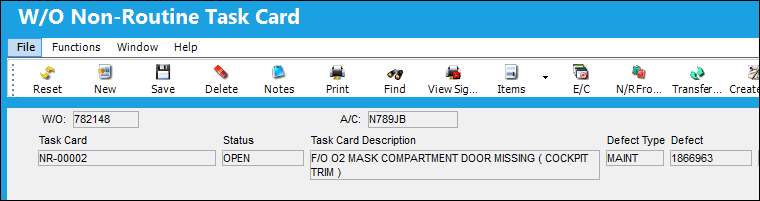
For more information regarding the Non Routine Task Card Window, please refer to the Non-Routine Task Card button, General Tab via the Production Training Manual.
Share
Print
|
©1997-2026 Trax USA Corp. All rights reserved. This manual may not be copied, photocopied, reproduced, translated, or converted to any electronic or machine-readable form, in whole or in part, without prior written approval from Trax USA Corp. |
 |